Most of this book treats data as something already sitting in an R data.frame: you read a CSV, you have \(n\) rows in memory, you fit a model. That model breaks down the moment the data is larger than memory, lives in many files, or has to be queried before any modeling can begin. This chapter is about the layer underneath the model, the storage and execution engine that turns raw bytes on disk into the columns a model consumes. The two tools that have reshaped this layer for analytics on a single machine are DuckDB, an in-process columnar database, and Apache Arrow, a standardized in-memory columnar format.
The point is not to learn a new query language for its own sake. It is to understand why a columnar, in-process engine can scan tens of gigabytes of Parquet1 on a laptop while a row-oriented approach chokes, and how to wire that engine into an R modeling workflow so the heavy data work happens before data ever materializes as a data.frame. The runnable demo is pure base R: a side-by-side measurement of row-wise versus columnar aggregation that exposes the mechanism, since the duckdb and arrow packages are usually not installed.
By the end of the chapter you should be able to explain, in one sentence and with a back-of-envelope formula, why columnar storage wins for analytics; read the idiomatic R code for both DuckDB and Arrow; and decide when this single-machine stack is the right tool versus when to reach for a transactional database or a cluster.
Intuition
Think of a spreadsheet stored as a stack of index cards, one card per row, versus the same data stored as a few long ribbons, one ribbon per column. To average a single column, the ribbon version lets you read one ribbon and ignore the rest; the index-card version forces you to handle every card and step over all the other fields on it. That contrast, repeated billions of times, is the whole story of this chapter.
100.1 Where This Fits in a Modern ML Workflow
A typical supervised-learning project spends a surprising fraction of its time before the model: reading files, filtering to the relevant population, joining reference tables, aggregating to the grain you actually model on, and engineering features (Chapter 83). When the source data is small this is invisible. When it is tens of millions of rows spread across hundreds of Parquet files, this stage dominates, and doing it naively (read everything into memory, then dplyr) either fails or wastes most of the runtime.
DuckDB and Arrow attack this stage. The pattern, which recurs throughout the chapter, has three steps:
Keep raw data on disk in a columnar file format (Parquet), partitioned by a natural key such as date.
Push filtering, joining, and aggregation down to an engine that reads only the columns and row groups it needs.2
Materialize into R only the small, model-ready table that comes out the other end.
This is the “thin client, fat engine” idea applied to a single machine. The model code stays in R, parsnip, glmnet, or xgboost. The data preparation runs in a vectorized C++ engine that never leaves your process and never copies data across a network. For a data scientist this means you can prototype on a laptop against data that used to require a cluster; for a data engineer it means the same Parquet files serve both the warehouse and the local analyst without a separate extract.
100.2 Row Stores Versus Columnar Stores
With the workflow in view, we can now look at the single design decision that makes columnar engines fast. The central design choice is physical layout: how the values of a table are arranged in memory or on disk.
A row store keeps each record contiguous. For a table with columns \((c_1, \dots, c_p)\) and rows \(1, \dots, n\), the bytes are ordered
This is ideal for analytical work (OLAP): a query like “average of \(c_3\) over all rows” reads exactly one contiguous run of bytes and ignores the other \(p-1\) columns entirely.
100.2.1 Why the layout matters: an I/O model
Let the table have \(n\) rows and \(p\) columns, and suppose a query reads \(k\) of the \(p\) columns. Assume every value is \(b\) bytes for simplicity. The number of bytes a scan must move is, for a row store,
\[
B_{\text{row}} = n \cdot p \cdot b,
\]
because rows are interleaved, so reaching the \(k\) wanted columns still pulls the surrounding \(p-k\) columns through the memory hierarchy. For a column store,
\[
B_{\text{col}} = n \cdot k \cdot b,
\]
because the unwanted columns are never touched. The ratio
is the first-order speedup from columnar storage on a wide-table aggregation. Analytical queries usually have \(k \ll p\) (you select a handful of columns from a table with dozens or hundreds), so the gain is large.
Key idea
For a scan that touches \(k\) of \(p\) columns, a column store moves roughly \(p/k\) times fewer bytes than a row store. Read 5 columns of a 60-column table and you have already skipped about 90% of the data before any arithmetic happens.
Two further effects compound this. First, compression: a column holds values of one type with low local entropy (repeated categories, slowly changing numbers), so run-length, dictionary, and delta encodings shrink it far more than a mixed row. Second, vectorization: a contiguous typed array of length \(n\) lets the CPU apply one operation across many values using SIMD instructions and tight cache-friendly loops, with cost roughly
\[
T_{\text{col}} \approx \alpha \, n \, k
\]
for some small per-value constant \(\alpha\), versus a row scan that pays per-row interpretation overhead \(\beta\) on every one of the \(p\) fields,
Both the data-volume ratio \(p/k\) and the per-value constant ratio \(\beta/\alpha\) favor columns for analytics. Table 100.1 summarizes how the two layouts compare across the properties that matter for analytical workloads.
Table 100.1: Row store versus column store across the properties that drive the choice between transactional and analytical workloads.
Property
Row store (OLTP)
Column store (OLAP)
Physical layout
Records contiguous
Columns contiguous
Best workload
Point reads/writes, single-record updates
Scans, aggregations, group-by over many rows
Bytes scanned for \(k\) of \(p\) columns
\(\propto n p\)
\(\propto n k\)
Compression
Modest (mixed types per block)
High (uniform type per column)
Vectorization (SIMD)
Hard, fields interleaved
Natural, typed contiguous arrays
Insert one row
Cheap
Expensive (touches every column)
Examples
PostgreSQL, MySQL, SQLite
DuckDB, ClickHouse, Parquet on disk
The takeaway is not that columns are universally better. They are better for the read-heavy, scan-heavy, few-columns-of-many pattern that defines analytics and feature engineering, and worse for high-rate single-row transactions.
Note
OLTP (online transaction processing) and OLAP (online analytical processing) name the two ends of this trade-off. OLTP is the small, frequent reads and writes of an application database (record an order, look up a user). OLAP is the large scans and aggregations of analytics (average revenue by region over three years). Row stores serve the former, column stores the latter.
With the mechanism settled in the abstract, the next two sections introduce the concrete tools that implement it: DuckDB as the execution engine, and Arrow as the shared format that lets pieces of the pipeline exchange data for free.
100.3 DuckDB: An In-Process OLAP Engine
DuckDB is a columnar OLAP database that runs in process, meaning it executes inside your R session as a linked library rather than as a separate server you connect to over a socket. SQLite occupies the same niche for transactional, row-oriented workloads; DuckDB is the analytical counterpart. There is no server to install, no port, no authentication, and no network hop. You call a function, the query runs on your machine’s cores against your machine’s memory and disk, and results come back as an R object.
Intuition
DuckDB is to analytics what SQLite is to application data: a whole database that lives inside your program as a library, with no server to run. You get SQL and a query optimizer, but the “database” is just your R process.
Three properties make it relevant here:
Columnar, vectorized execution. Queries run over batches of column values, so the \(p/k\) and SIMD3 advantages above apply directly.
Reads Parquet and CSV directly. You can run SQL against files on disk without first loading them into the database, and DuckDB uses Parquet metadata to skip files and row groups that cannot match the filter (predicate pushdown).
Larger-than-memory. The engine spills intermediate results to disk when a query needs more memory than is available, so a group-by over a dataset bigger than RAM completes instead of crashing.
The code below shows the idiomatic R usage through the DBI interface and the dplyr backend. It is marked eval=FALSE because duckdb and DBI are not assumed installed; the code is current and runnable as written.
Show code
library(DBI)library(duckdb)# In-process connection. ":memory:" keeps the catalog in RAM;# pass a file path to persist a database.con<-dbConnect(duckdb::duckdb(), dbdir =":memory:")# Query a directory of Parquet files directly, without loading them.# Only the three referenced columns and the row groups whose# statistics overlap the filter are read from disk.result<-dbGetQuery(con, " SELECT region, AVG(amount) AS mean_amount, COUNT(*) AS n FROM read_parquet('data/sales/*.parquet') WHERE year >= 2022 GROUP BY region ORDER BY mean_amount DESC")dbDisconnect(con, shutdown =TRUE)
If SQL is not your preference, DuckDB also exposes a dplyr backend, so you can write the same pipeline in tidyverse syntax and let it compile to SQL. Computation stays in the engine until you call collect(), which is the only point where data crosses into an R data.frame.
Tip
The lazy pipeline below does no work as you build it. Each verb adds to a query plan; nothing reads from disk until collect(). That is what lets you describe a transformation over a terabyte and still pay only for the small result.
Show code
library(duckdb)library(dplyr)con<-DBI::dbConnect(duckdb::duckdb())# Register a Parquet dataset as a lazy table; nothing is read yet.sales<-tbl(con, "read_parquet('data/sales/*.parquet')")model_table<-sales|>filter(year>=2022)|>group_by(region)|>summarise(mean_amount =mean(amount, na.rm =TRUE), n =n())|>arrange(desc(mean_amount))|>collect()# only here does the small result enter R memory
100.4 Apache Arrow: A Standard In-Memory Columnar Format
Where DuckDB is an engine, Arrow is a format: a precise specification for how a columnar table is laid out in RAM. An Arrow column is a typed, contiguous buffer of values plus a validity bitmap4 marking nulls. Because the layout is fixed and language-independent, any tool that speaks Arrow agrees on the exact bytes.
Note
Keep the distinction clear. Parquet is a columnar format on disk; Arrow is a columnar format in memory; DuckDB is an engine that reads both and runs queries. They are designed to fit together, not to compete.
The payoff is zero-copy data sharing. If R and DuckDB (or Python, or a Parquet reader) all represent a table in the Arrow format, handing the table from one to another means passing a pointer to the existing buffers, not serializing and re-parsing the data. Define the cost of moving a table of \(S\) bytes between two systems as
\[
C_{\text{copy}} = c_{\text{serialize}} \cdot S + c_{\text{transfer}} \cdot S + c_{\text{deserialize}} \cdot S,
\]
a quantity linear in the data size with three nonzero constants. Arrow’s shared layout drives the serialize and deserialize terms to zero, leaving
\[
C_{\text{zero-copy}} = O(1),
\]
because only a handle (pointer, length, schema) changes hands regardless of how large \(S\) is. For a pipeline that passes a billion-row table from the storage layer to the compute layer, removing an \(O(S)\) copy at each boundary is the difference between feasible and not.
Key idea
Zero-copy means handing over an address, not a duplicate. When R and DuckDB both hold the data in Arrow format, passing a table between them costs \(O(1)\) instead of \(O(S)\), no matter how big the table is.
Arrow in R is most useful for two jobs:
Reading and writing Parquet and Feather, with column selection and row-group filtering pushed down so you never read columns you do not use.
Lazy datasets over many files, exposed through the same dplyr verbs, so a folder of partitioned Parquet behaves like one table that is filtered before it is read.
Show code
library(arrow)library(dplyr)# Point at a partitioned Parquet directory (e.g. .../year=2023/region=west/).ds<-open_dataset("data/sales", format ="parquet")# This pipeline is lazy: column projection and the year filter are# pushed down so only the needed columns and matching partitions# are read from disk. collect() materializes the small result.feature_tbl<-ds|>filter(year>=2022, amount>0)|>select(region, amount, channel)|>group_by(region, channel)|>summarise(mean_amount =mean(amount), n =n(), .groups ="drop")|>collect()
DuckDB and Arrow are complementary, not competitors. A common stack registers an Arrow dataset, runs SQL or dplyr through DuckDB over it, and gets the result back as an Arrow table that R reads with zero copy. The query below shows DuckDB consuming an Arrow dataset object directly.
Show code
library(duckdb)library(arrow)library(dplyr)ds<-open_dataset("data/sales", format ="parquet")con<-DBI::dbConnect(duckdb::duckdb())# Hand the Arrow dataset to DuckDB with no data copy, query it in SQL,# and stream the result back as Arrow.duckdb::duckdb_register_arrow(con, "sales", ds)out<-dbGetQuery(con, " SELECT region, COUNT(*) AS n, AVG(amount) AS mean_amount FROM sales WHERE year >= 2022 GROUP BY region")
100.5 A Runnable Demonstration in Base R
The mechanism behind columnar speedups is concrete enough to measure without any special package. We store the same table two ways and run the same aggregation against each: a row-wise representation (a list of records, each a small named vector, the way a row store interleaves fields) and a columnar representation (a data.frame, which stores each column as one contiguous atomic vector, the way a column store keeps them).
The task is a group-by mean of one numeric column out of several, exactly the \(k \ll p\) analytical pattern. The columnar version operates on whole typed vectors; the row version walks records one at a time and pulls every field of each record into the interpreter.
Note
This is a teaching model, not a benchmark of DuckDB itself. We are isolating one effect, layout and traversal, in plain R so the cause is visible. A real columnar engine adds compression and SIMD on top, which is why its advantage at scale dwarfs what we see here.
Show code
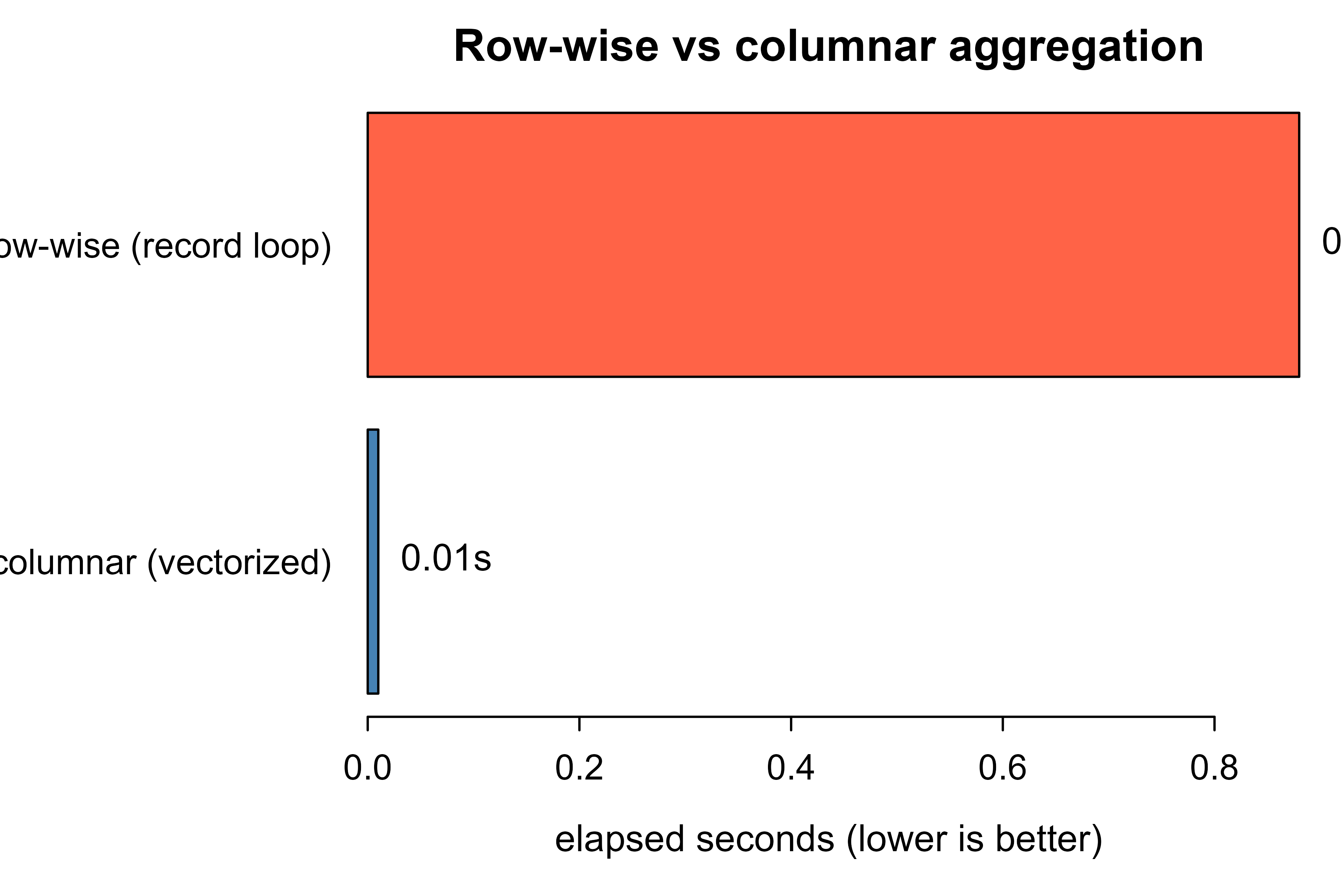
set.seed(1)n<-200000# rowsp<-8# columns (we aggregate just one of them)groups<-sample(LETTERS[1:5], n, replace =TRUE)value<-rnorm(n, mean =10, sd =3)# Columnar layout: a data.frame stores each column as one contiguous vector.df<-data.frame( g =groups, x =value, c3 =rnorm(n), c4 =rnorm(n), c5 =rnorm(n), c6 =rnorm(n), c7 =rnorm(n), c8 =rnorm(n))# Row layout: a list of records, each record a named list of all p fields.# This mimics how a row store interleaves every column per record.rows<-lapply(seq_len(n), function(i){list(g =df$g[i], x =df$x[i], c3 =df$c3[i], c4 =df$c4[i], c5 =df$c5[i], c6 =df$c6[i], c7 =df$c7[i], c8 =df$c8[i])})# Columnar aggregation: vectorized over the single contiguous column x.col_agg<-function(d){vapply(split(d$x, d$g), mean, numeric(1))}# Row-wise aggregation: visit each record, accumulate sum and count.row_agg<-function(rs){sums<-numeric(0)counts<-numeric(0)for(rinrs){# walk records one at a timeg<-r$gif(is.na(sums[g])){sums[g]<-0; counts[g]<-0}sums[g]<-sums[g]+r$x# touches the record; row layout costcounts[g]<-counts[g]+1}sums/counts}t_col<-system.time(res_col<-col_agg(df))["elapsed"]t_row<-system.time(res_row<-row_agg(rows))["elapsed"]# Same answer, up to ordering.stopifnot(all.equal(sort(res_col), sort(res_row[names(res_col)])))timing<-data.frame( layout =c("columnar (vectorized)", "row-wise (record loop)"), seconds =round(c(t_col, t_row), 3), speedup =round(c(1, t_row/t_col), 1))print(timing)#> layout seconds speedup#> columnar (vectorized) 0.01 1#> elapsed row-wise (record loop) 0.88 88
The columnar version is far faster on the same logical query, and the gap widens with \(n\). Two forces are visible here even in pure R. The columnar call applies mean to one contiguous numeric vector per group, so the work is a tight vectorized loop in compiled code. The row-wise call interprets each of the \(n\) records individually and carries the overhead of touching a record that physically bundles all \(p\) fields, which is the \(\beta \, n \, p\) versus \(\alpha \, n \, k\) distinction made earlier. DuckDB and Arrow push this same idea down into C++ with SIMD and compression, which is why the effect is dramatic at scale.
Show code
op<-par(mar =c(4, 8, 2, 1))barplot(timing$seconds, names.arg =timing$layout, horiz =TRUE, las =1, col =c("steelblue", "tomato"), xlab ="elapsed seconds (lower is better)", main ="Row-wise vs columnar aggregation")text(x =timing$seconds, y =c(0.7, 1.9), labels =paste0(timing$seconds, "s"), pos =4, xpd =NA)par(op)
Figure 100.1: Elapsed time for the same group-by aggregation under a row-wise record layout versus a columnar vectorized layout. The columnar layout reads and processes one contiguous typed column; the row layout walks interleaved records.
Figure 100.1 makes the asymmetry plain: the same answer, computed two ways, with elapsed time differing by a large factor purely because of how the values were laid out and traversed. That single decision, layout, is what a columnar engine industrializes.
100.6 Larger-Than-Memory Queries
The demonstration measured speed on data that already fit in memory. The more practical reason to reach for DuckDB or Arrow is data that does not fit in RAM at all. Three mechanisms make this work, none of which require changing your query.
Column projection. Reading \(k\) of \(p\) columns moves \(k/p\) of the bytes. If you model on 5 columns of a 60-column table, you skip more than 90% of the data before any computation.
Predicate and partition pushdown. Parquet stores per-row-group min/max statistics. A filter such as year >= 2022 lets the reader skip any row group whose maximum year is below 2022, and partitioned directories let it skip whole folders. Both shrink the scan before decompression.
Spill to disk. When an aggregation or join needs more working memory than is available, DuckDB writes intermediate partitions to a temporary directory and processes them in pieces, so peak memory is bounded by a configurable limit rather than by the data size.
Concretely, suppose a dataset has \(N\) total rows across many Parquet files, a fraction \(f\) of which satisfy the filter, and your query needs \(k\) of \(p\) columns. The bytes actually scanned scale like
\[
B \approx N \cdot f \cdot \frac{k}{p} \cdot b,
\]
not \(N \cdot p \cdot b\). With \(f = 0.1\), \(k/p = 0.1\), you read on the order of \(1\%\) of the raw bytes. That is the difference between a query that runs on a laptop and one that does not.
Warning
These savings depend on the file format. Column projection and pushdown rely on Parquet’s columnar layout and row-group statistics. Run the same query against CSV and the reader must parse every byte, so the \(k/p\) and \(f\) factors vanish. Converting to Parquet once is what unlocks the rest.
Show code
library(DBI); library(duckdb)con<-dbConnect(duckdb::duckdb())# Bound peak memory and let large queries spill to disk.dbExecute(con, "SET memory_limit = '4GB'")dbExecute(con, "SET temp_directory = '/tmp/duckdb_spill'")# Aggregate a dataset far larger than 4 GB; the engine spills as needed.big<-dbGetQuery(con, " SELECT customer_id, SUM(amount) AS total FROM read_parquet('data/events/*.parquet') GROUP BY customer_id")dbDisconnect(con, shutdown =TRUE)
100.7 Practical Guidance, Pitfalls, and When to Use It
Knowing the mechanism is half the job; the other half is judgment about when it pays off and what tends to go wrong. This section collects that judgment.
When to use this
Reach for DuckDB or Arrow when the data is too large for memory or scattered across many files, the heavy work is filtering, joining, and aggregating down to a small model-ready table, and you want a local setup with no server or cluster to manage.
The same conditions, stated as a checklist, mark when this approach is the right call:
The data is too large for read.csv or readr to hold in memory, or it is spread across many Parquet files.
The expensive work is filtering, joining, and aggregating, and the model-ready table that comes out is small.
You want a local, dependency-light setup: no database server, no cluster, no Spark, just files and an in-process engine.
When to prefer something else:
High-rate single-row inserts and updates (a transactional application) belong in a row store such as PostgreSQL or SQLite. Column stores pay a high price to write one row.
Genuinely distributed data across many machines, with terabytes that exceed one node, is the place for Spark (sparklyr; see Chapter 96) or a warehouse, not a single-process engine.
If the whole dataset already fits comfortably in RAM and you only touch it a few times, plain data.table or dplyr is simpler and fast enough.
A handful of pitfalls account for most of the trouble people hit in practice:
Materialize late. The most common mistake is calling collect() (or as.data.frame) too early, which pulls the full dataset into R and discards every advantage. Keep filtering, joining, and aggregating inside the engine and collect() only the final small table.
File format matters. Querying CSV gives you the engine but not the skipping: CSV has no column projection or row-group statistics, so the reader still parses every byte. Convert to Parquet once and query that.
Partition on what you filter. Partitioning Parquet by a column you rarely filter on buys nothing and creates many tiny files; partition by the key that appears in WHERE clauses (often date or region), and avoid over-partitioning into thousands of small files, which adds open/close overhead.
Types must be consistent across files. A dataset spanning many Parquet files fails or silently coerces if the same column has different types in different files. Fix the schema at write time.
Zero-copy needs a shared format. The handoff between R, Arrow, and DuckDB is zero-copy only when both sides hold Arrow buffers. Converting to a base R data.frame materializes a real copy, so do it once at the end, not between every step.
Memory limit versus available RAM. Spill-to-disk works only if you set a memory_limit below physical RAM and provide a temp_directory with enough free space; without a limit a runaway query can still exhaust memory.
Reproducibility of versions. Parquet and Arrow are stable formats, but pin the arrow and duckdb package versions in a project that ships, since on-disk and IPC details do evolve across major versions.
A workable default for a local modeling project: store inputs as Parquet partitioned by date, do all reshaping and feature aggregation through a DuckDB or Arrow dplyr pipeline, collect() the model-ready frame once, and hand it to your usual R modeling stack (for example the tidymodels framework, Chapter 90). The data layer scales to far larger inputs than memory while the modeling code stays unchanged.
To recap the chapter in one breath: columnar layout lets a scan read only the columns and rows a query needs, vectorized execution then processes those columns fast, Arrow lets the pieces of the pipeline share that data without copying, and DuckDB packages all of it as an engine inside your R session. The result is that the data-preparation stage, which used to set the ceiling on how large a problem you could tackle on one machine, mostly stops being the bottleneck.
100.8 Further Reading
Boncz, P., Zukowski, M., and Nes, N. (2005). MonetDB/X100: Hyper-pipelining query execution. CIDR. The vectorized columnar execution model that DuckDB builds on.
Stonebraker, M., et al. (2005). C-Store: A column-oriented DBMS. VLDB. Foundational column-store design and its OLAP rationale.
Abadi, D., Madden, S., and Hachem, N. (2008). Column-stores vs. row-stores: How different are they really? SIGMOD. Careful analysis of where the columnar advantage actually comes from.
Raasveldt, M., and Muhleisen, H. (2019). DuckDB: An embeddable analytical database. SIGMOD (demonstration). The system paper for in-process OLAP.
Raasveldt, M., and Muhleisen, H. (2020). Data management for data science: Towards embedded analytics. CIDR. Motivation for running the engine inside the analyst’s process.
The Apache Arrow project (2016, ongoing). Apache Arrow columnar format specification. apache.org/arrow. The in-memory layout and zero-copy interchange contract.
Vohra, D. (2016). Apache Parquet. In Practical Hadoop Ecosystem. Apress. Background on the on-disk columnar format and its row-group statistics.
Wickham, H., Cetinkaya-Rundel, M., and Grolemund, G. (2023). R for Data Science, 2nd ed. O’Reilly. Practical Arrow and DuckDB usage from R through dplyr (the “Arrow” and “Databases” chapters).
Parquet is a compressed, columnar file format for on-disk storage. Where a CSV stores rows of text, Parquet stores each column separately as a typed, compressed block, along with small statistics (like per-block min and max) that let a reader skip blocks it does not need.↩︎
“Pushing down” means the engine performs the operation as close to the data as possible, deciding what to skip before it reads, rather than reading everything and filtering afterward in R.↩︎
SIMD (single instruction, multiple data) is a CPU feature that applies one operation to many adjacent values at once. It works well only when the values sit in a contiguous typed array, which is exactly what a column store provides.↩︎
A validity bitmap is one bit per value recording whether that value is present or null, stored separately from the values themselves. It is how Arrow represents missing data without disturbing the contiguous run of values.↩︎
Source Code
# In-Process Analytics with DuckDB and Arrow {#sec-duckdb-arrow}```{r}#| include: falsesource("_common.R")```Most of this book treats data as something already sitting in an R `data.frame`: you read a CSV, you have $n$ rows in memory, you fit a model. That model breaks down the moment the data is larger than memory, lives in many files, or has to be queried before any modeling can begin. This chapter is about the layer underneath the model, the storage and execution engine that turns raw bytes on disk into the columns a model consumes. The two tools that have reshaped this layer for analytics on a single machine are DuckDB, an in-process columnar database, and Apache Arrow, a standardized in-memory columnar format.The point is not to learn a new query language for its own sake. It is to understand why a columnar, in-process engine can scan tens of gigabytes of Parquet^[Parquet is a compressed, columnar file format for on-disk storage. Where a CSV stores rows of text, Parquet stores each column separately as a typed, compressed block, along with small statistics (like per-block min and max) that let a reader skip blocks it does not need.] on a laptop while a row-oriented approach chokes, and how to wire that engine into an R modeling workflow so the heavy data work happens before data ever materializes as a `data.frame`. The runnable demo is pure base R: a side-by-side measurement of row-wise versus columnar aggregation that exposes the mechanism, since the `duckdb` and `arrow` packages are usually not installed.By the end of the chapter you should be able to explain, in one sentence and with a back-of-envelope formula, why columnar storage wins for analytics; read the idiomatic R code for both DuckDB and Arrow; and decide when this single-machine stack is the right tool versus when to reach for a transactional database or a cluster.::: {.callout-tip title="Intuition"}Think of a spreadsheet stored as a stack of index cards, one card per row, versus the same data stored as a few long ribbons, one ribbon per column. To average a single column, the ribbon version lets you read one ribbon and ignore the rest; the index-card version forces you to handle every card and step over all the other fields on it. That contrast, repeated billions of times, is the whole story of this chapter.:::## Where This Fits in a Modern ML WorkflowA typical supervised-learning project spends a surprising fraction of its time before the model: reading files, filtering to the relevant population, joining reference tables, aggregating to the grain you actually model on, and engineering features (@sec-feature-engineering). When the source data is small this is invisible. When it is tens of millions of rows spread across hundreds of Parquet files, this stage dominates, and doing it naively (read everything into memory, then `dplyr`) either fails or wastes most of the runtime.DuckDB and Arrow attack this stage. The pattern, which recurs throughout the chapter, has three steps:- Keep raw data on disk in a columnar file format (Parquet), partitioned by a natural key such as date.- Push filtering, joining, and aggregation down to an engine that reads only the columns and row groups it needs.^["Pushing down" means the engine performs the operation as close to the data as possible, deciding what to skip before it reads, rather than reading everything and filtering afterward in R.]- Materialize into R only the small, model-ready table that comes out the other end.This is the "thin client, fat engine" idea applied to a single machine. The model code stays in R, parsnip, glmnet, or xgboost. The data preparation runs in a vectorized C++ engine that never leaves your process and never copies data across a network. For a data scientist this means you can prototype on a laptop against data that used to require a cluster; for a data engineer it means the same Parquet files serve both the warehouse and the local analyst without a separate extract.## Row Stores Versus Columnar StoresWith the workflow in view, we can now look at the single design decision that makes columnar engines fast. The central design choice is physical layout: how the values of a table are arranged in memory or on disk.A row store keeps each record contiguous. For a table with columns $(c_1, \dots, c_p)$ and rows $1, \dots, n$, the bytes are ordered$$\underbrace{r_{1,1}, r_{1,2}, \dots, r_{1,p}}_{\text{row 1}}, \;\underbrace{r_{2,1}, r_{2,2}, \dots, r_{2,p}}_{\text{row 2}}, \; \dots$$This is ideal for transactional work (OLTP): insert one row, read one row, update one row, all touch a single contiguous block.A column store keeps each column contiguous:$$\underbrace{r_{1,1}, r_{2,1}, \dots, r_{n,1}}_{\text{column } c_1}, \;\underbrace{r_{1,2}, r_{2,2}, \dots, r_{n,2}}_{\text{column } c_2}, \; \dots$$This is ideal for analytical work (OLAP): a query like "average of $c_3$ over all rows" reads exactly one contiguous run of bytes and ignores the other $p-1$ columns entirely.### Why the layout matters: an I/O modelLet the table have $n$ rows and $p$ columns, and suppose a query reads $k$ of the $p$ columns. Assume every value is $b$ bytes for simplicity. The number of bytes a scan must move is, for a row store,$$B_{\text{row}} = n \cdot p \cdot b,$$because rows are interleaved, so reaching the $k$ wanted columns still pulls the surrounding $p-k$ columns through the memory hierarchy. For a column store,$$B_{\text{col}} = n \cdot k \cdot b,$$because the unwanted columns are never touched. The ratio$$\frac{B_{\text{row}}}{B_{\text{col}}} = \frac{p}{k}$$is the first-order speedup from columnar storage on a wide-table aggregation. Analytical queries usually have $k \ll p$ (you select a handful of columns from a table with dozens or hundreds), so the gain is large.::: {.callout-important title="Key idea"}For a scan that touches $k$ of $p$ columns, a column store moves roughly $p/k$ times fewer bytes than a row store. Read 5 columns of a 60-column table and you have already skipped about 90% of the data before any arithmetic happens.:::Two further effects compound this. First, compression: a column holds values of one type with low local entropy (repeated categories, slowly changing numbers), so run-length, dictionary, and delta encodings shrink it far more than a mixed row. Second, vectorization: a contiguous typed array of length $n$ lets the CPU apply one operation across many values using SIMD instructions and tight cache-friendly loops, with cost roughly$$T_{\text{col}} \approx \alpha \, n \, k$$for some small per-value constant $\alpha$, versus a row scan that pays per-row interpretation overhead $\beta$ on every one of the $p$ fields,$$T_{\text{row}} \approx \beta \, n \, p, \qquad \beta > \alpha.$$Both the data-volume ratio $p/k$ and the per-value constant ratio $\beta/\alpha$ favor columns for analytics. @tbl-duckdb-arrow-row-vs-col-tradeoffs summarizes how the two layouts compare across the properties that matter for analytical workloads.| Property | Row store (OLTP) | Column store (OLAP) ||---|---|---|| Physical layout | Records contiguous | Columns contiguous || Best workload | Point reads/writes, single-record updates | Scans, aggregations, group-by over many rows || Bytes scanned for $k$ of $p$ columns | $\propto n p$ | $\propto n k$ || Compression | Modest (mixed types per block) | High (uniform type per column) || Vectorization (SIMD) | Hard, fields interleaved | Natural, typed contiguous arrays || Insert one row | Cheap | Expensive (touches every column) || Examples | PostgreSQL, MySQL, SQLite | DuckDB, ClickHouse, Parquet on disk |: Row store versus column store across the properties that drive the choice between transactional and analytical workloads. {#tbl-duckdb-arrow-row-vs-col-tradeoffs}The takeaway is not that columns are universally better. They are better for the read-heavy, scan-heavy, few-columns-of-many pattern that defines analytics and feature engineering, and worse for high-rate single-row transactions.::: {.callout-note}OLTP (online transaction processing) and OLAP (online analytical processing) name the two ends of this trade-off. OLTP is the small, frequent reads and writes of an application database (record an order, look up a user). OLAP is the large scans and aggregations of analytics (average revenue by region over three years). Row stores serve the former, column stores the latter.:::With the mechanism settled in the abstract, the next two sections introduce the concrete tools that implement it: DuckDB as the execution engine, and Arrow as the shared format that lets pieces of the pipeline exchange data for free.## DuckDB: An In-Process OLAP EngineDuckDB is a columnar OLAP database that runs in process, meaning it executes inside your R session as a linked library rather than as a separate server you connect to over a socket. SQLite occupies the same niche for transactional, row-oriented workloads; DuckDB is the analytical counterpart. There is no server to install, no port, no authentication, and no network hop. You call a function, the query runs on your machine's cores against your machine's memory and disk, and results come back as an R object.::: {.callout-tip title="Intuition"}DuckDB is to analytics what SQLite is to application data: a whole database that lives inside your program as a library, with no server to run. You get SQL and a query optimizer, but the "database" is just your R process.:::Three properties make it relevant here:- Columnar, vectorized execution. Queries run over batches of column values, so the $p/k$ and SIMD^[SIMD (single instruction, multiple data) is a CPU feature that applies one operation to many adjacent values at once. It works well only when the values sit in a contiguous typed array, which is exactly what a column store provides.] advantages above apply directly.- Reads Parquet and CSV directly. You can run SQL against files on disk without first loading them into the database, and DuckDB uses Parquet metadata to skip files and row groups that cannot match the filter (predicate pushdown).- Larger-than-memory. The engine spills intermediate results to disk when a query needs more memory than is available, so a group-by over a dataset bigger than RAM completes instead of crashing.The code below shows the idiomatic R usage through the DBI interface and the dplyr backend. It is marked `eval=FALSE` because `duckdb` and `DBI` are not assumed installed; the code is current and runnable as written.```{r duckdb-dbi, eval=FALSE}library(DBI)library(duckdb)# In-process connection. ":memory:" keeps the catalog in RAM;# pass a file path to persist a database.con <-dbConnect(duckdb::duckdb(), dbdir =":memory:")# Query a directory of Parquet files directly, without loading them.# Only the three referenced columns and the row groups whose# statistics overlap the filter are read from disk.result <-dbGetQuery(con, " SELECT region, AVG(amount) AS mean_amount, COUNT(*) AS n FROM read_parquet('data/sales/*.parquet') WHERE year >= 2022 GROUP BY region ORDER BY mean_amount DESC")dbDisconnect(con, shutdown =TRUE)```If SQL is not your preference, DuckDB also exposes a dplyr backend, so you can write the same pipeline in tidyverse syntax and let it compile to SQL. Computation stays in the engine until you call `collect()`, which is the only point where data crosses into an R `data.frame`.::: {.callout-tip}The lazy pipeline below does no work as you build it. Each verb adds to a query plan; nothing reads from disk until `collect()`. That is what lets you describe a transformation over a terabyte and still pay only for the small result.:::```{r duckdb-dplyr, eval=FALSE}library(duckdb)library(dplyr)con <- DBI::dbConnect(duckdb::duckdb())# Register a Parquet dataset as a lazy table; nothing is read yet.sales <-tbl(con, "read_parquet('data/sales/*.parquet')")model_table <- sales |>filter(year >=2022) |>group_by(region) |>summarise(mean_amount =mean(amount, na.rm =TRUE),n =n()) |>arrange(desc(mean_amount)) |>collect() # only here does the small result enter R memory```## Apache Arrow: A Standard In-Memory Columnar FormatWhere DuckDB is an engine, Arrow is a format: a precise specification for how a columnar table is laid out in RAM. An Arrow column is a typed, contiguous buffer of values plus a validity bitmap^[A validity bitmap is one bit per value recording whether that value is present or null, stored separately from the values themselves. It is how Arrow represents missing data without disturbing the contiguous run of values.] marking nulls. Because the layout is fixed and language-independent, any tool that speaks Arrow agrees on the exact bytes.::: {.callout-note}Keep the distinction clear. Parquet is a columnar format on disk; Arrow is a columnar format in memory; DuckDB is an engine that reads both and runs queries. They are designed to fit together, not to compete.:::The payoff is zero-copy data sharing. If R and DuckDB (or Python, or a Parquet reader) all represent a table in the Arrow format, handing the table from one to another means passing a pointer to the existing buffers, not serializing and re-parsing the data. Define the cost of moving a table of $S$ bytes between two systems as$$C_{\text{copy}} = c_{\text{serialize}} \cdot S + c_{\text{transfer}} \cdot S + c_{\text{deserialize}} \cdot S,$$a quantity linear in the data size with three nonzero constants. Arrow's shared layout drives the serialize and deserialize terms to zero, leaving$$C_{\text{zero-copy}} = O(1),$$because only a handle (pointer, length, schema) changes hands regardless of how large $S$ is. For a pipeline that passes a billion-row table from the storage layer to the compute layer, removing an $O(S)$ copy at each boundary is the difference between feasible and not.::: {.callout-important title="Key idea"}Zero-copy means handing over an address, not a duplicate. When R and DuckDB both hold the data in Arrow format, passing a table between them costs $O(1)$ instead of $O(S)$, no matter how big the table is.:::Arrow in R is most useful for two jobs:- Reading and writing Parquet and Feather, with column selection and row-group filtering pushed down so you never read columns you do not use.- Lazy datasets over many files, exposed through the same dplyr verbs, so a folder of partitioned Parquet behaves like one table that is filtered before it is read.```{r arrow-dataset, eval=FALSE}library(arrow)library(dplyr)# Point at a partitioned Parquet directory (e.g. .../year=2023/region=west/).ds <-open_dataset("data/sales", format ="parquet")# This pipeline is lazy: column projection and the year filter are# pushed down so only the needed columns and matching partitions# are read from disk. collect() materializes the small result.feature_tbl <- ds |>filter(year >=2022, amount >0) |>select(region, amount, channel) |>group_by(region, channel) |>summarise(mean_amount =mean(amount), n =n(), .groups ="drop") |>collect()```DuckDB and Arrow are complementary, not competitors. A common stack registers an Arrow dataset, runs SQL or dplyr through DuckDB over it, and gets the result back as an Arrow table that R reads with zero copy. The query below shows DuckDB consuming an Arrow dataset object directly.```{r duckdb-arrow-bridge, eval=FALSE}library(duckdb)library(arrow)library(dplyr)ds <-open_dataset("data/sales", format ="parquet")con <- DBI::dbConnect(duckdb::duckdb())# Hand the Arrow dataset to DuckDB with no data copy, query it in SQL,# and stream the result back as Arrow.duckdb::duckdb_register_arrow(con, "sales", ds)out <-dbGetQuery(con, " SELECT region, COUNT(*) AS n, AVG(amount) AS mean_amount FROM sales WHERE year >= 2022 GROUP BY region")```## A Runnable Demonstration in Base RThe mechanism behind columnar speedups is concrete enough to measure without any special package. We store the same table two ways and run the same aggregation against each: a row-wise representation (a list of records, each a small named vector, the way a row store interleaves fields) and a columnar representation (a `data.frame`, which stores each column as one contiguous atomic vector, the way a column store keeps them).The task is a group-by mean of one numeric column out of several, exactly the $k \ll p$ analytical pattern. The columnar version operates on whole typed vectors; the row version walks records one at a time and pulls every field of each record into the interpreter.::: {.callout-note}This is a teaching model, not a benchmark of DuckDB itself. We are isolating one effect, layout and traversal, in plain R so the cause is visible. A real columnar engine adds compression and SIMD on top, which is why its advantage at scale dwarfs what we see here.:::```{r row-vs-col-demo}set.seed(1)n <-200000# rowsp <-8# columns (we aggregate just one of them)groups <-sample(LETTERS[1:5], n, replace =TRUE)value <-rnorm(n, mean =10, sd =3)# Columnar layout: a data.frame stores each column as one contiguous vector.df <-data.frame(g = groups,x = value,c3 =rnorm(n), c4 =rnorm(n), c5 =rnorm(n),c6 =rnorm(n), c7 =rnorm(n), c8 =rnorm(n))# Row layout: a list of records, each record a named list of all p fields.# This mimics how a row store interleaves every column per record.rows <-lapply(seq_len(n), function(i) {list(g = df$g[i], x = df$x[i],c3 = df$c3[i], c4 = df$c4[i], c5 = df$c5[i],c6 = df$c6[i], c7 = df$c7[i], c8 = df$c8[i])})# Columnar aggregation: vectorized over the single contiguous column x.col_agg <-function(d) {vapply(split(d$x, d$g), mean, numeric(1))}# Row-wise aggregation: visit each record, accumulate sum and count.row_agg <-function(rs) { sums <-numeric(0) counts <-numeric(0)for (r in rs) { # walk records one at a time g <- r$gif (is.na(sums[g])) { sums[g] <-0; counts[g] <-0 } sums[g] <- sums[g] + r$x # touches the record; row layout cost counts[g] <- counts[g] +1 } sums / counts}t_col <-system.time(res_col <-col_agg(df))["elapsed"]t_row <-system.time(res_row <-row_agg(rows))["elapsed"]# Same answer, up to ordering.stopifnot(all.equal(sort(res_col), sort(res_row[names(res_col)])))timing <-data.frame(layout =c("columnar (vectorized)", "row-wise (record loop)"),seconds =round(c(t_col, t_row), 3),speedup =round(c(1, t_row / t_col), 1))print(timing)```The columnar version is far faster on the same logical query, and the gap widens with $n$. Two forces are visible here even in pure R. The columnar call applies `mean` to one contiguous numeric vector per group, so the work is a tight vectorized loop in compiled code. The row-wise call interprets each of the $n$ records individually and carries the overhead of touching a record that physically bundles all $p$ fields, which is the $\beta \, n \, p$ versus $\alpha \, n \, k$ distinction made earlier. DuckDB and Arrow push this same idea down into C++ with SIMD and compression, which is why the effect is dramatic at scale.```{r fig-duckdb-arrow-row-vs-col, fig.width=6, fig.height=4, fig.cap="Elapsed time for the same group-by aggregation under a row-wise record layout versus a columnar vectorized layout. The columnar layout reads and processes one contiguous typed column; the row layout walks interleaved records."}op <-par(mar =c(4, 8, 2, 1))barplot( timing$seconds,names.arg = timing$layout,horiz =TRUE,las =1,col =c("steelblue", "tomato"),xlab ="elapsed seconds (lower is better)",main ="Row-wise vs columnar aggregation")text(x = timing$seconds, y =c(0.7, 1.9),labels =paste0(timing$seconds, "s"), pos =4, xpd =NA)par(op)```@fig-duckdb-arrow-row-vs-col makes the asymmetry plain: the same answer, computed two ways, with elapsed time differing by a large factor purely because of how the values were laid out and traversed. That single decision, layout, is what a columnar engine industrializes.## Larger-Than-Memory QueriesThe demonstration measured speed on data that already fit in memory. The more practical reason to reach for DuckDB or Arrow is data that does not fit in RAM at all. Three mechanisms make this work, none of which require changing your query.- Column projection. Reading $k$ of $p$ columns moves $k/p$ of the bytes. If you model on 5 columns of a 60-column table, you skip more than 90% of the data before any computation.- Predicate and partition pushdown. Parquet stores per-row-group min/max statistics. A filter such as `year >= 2022` lets the reader skip any row group whose maximum `year` is below 2022, and partitioned directories let it skip whole folders. Both shrink the scan before decompression.- Spill to disk. When an aggregation or join needs more working memory than is available, DuckDB writes intermediate partitions to a temporary directory and processes them in pieces, so peak memory is bounded by a configurable limit rather than by the data size.Concretely, suppose a dataset has $N$ total rows across many Parquet files, a fraction $f$ of which satisfy the filter, and your query needs $k$ of $p$ columns. The bytes actually scanned scale like$$B \approx N \cdot f \cdot \frac{k}{p} \cdot b,$$not $N \cdot p \cdot b$. With $f = 0.1$, $k/p = 0.1$, you read on the order of $1\%$ of the raw bytes. That is the difference between a query that runs on a laptop and one that does not.::: {.callout-warning}These savings depend on the file format. Column projection and pushdown rely on Parquet's columnar layout and row-group statistics. Run the same query against CSV and the reader must parse every byte, so the $k/p$ and $f$ factors vanish. Converting to Parquet once is what unlocks the rest.:::```{r duckdb-memory-cap, eval=FALSE}library(DBI); library(duckdb)con <-dbConnect(duckdb::duckdb())# Bound peak memory and let large queries spill to disk.dbExecute(con, "SET memory_limit = '4GB'")dbExecute(con, "SET temp_directory = '/tmp/duckdb_spill'")# Aggregate a dataset far larger than 4 GB; the engine spills as needed.big <-dbGetQuery(con, " SELECT customer_id, SUM(amount) AS total FROM read_parquet('data/events/*.parquet') GROUP BY customer_id")dbDisconnect(con, shutdown =TRUE)```## Practical Guidance, Pitfalls, and When to Use ItKnowing the mechanism is half the job; the other half is judgment about when it pays off and what tends to go wrong. This section collects that judgment.::: {.callout-tip title="When to use this"}Reach for DuckDB or Arrow when the data is too large for memory or scattered across many files, the heavy work is filtering, joining, and aggregating down to a small model-ready table, and you want a local setup with no server or cluster to manage.:::The same conditions, stated as a checklist, mark when this approach is the right call:- The data is too large for `read.csv` or `readr` to hold in memory, or it is spread across many Parquet files.- The expensive work is filtering, joining, and aggregating, and the model-ready table that comes out is small.- You want a local, dependency-light setup: no database server, no cluster, no Spark, just files and an in-process engine.When to prefer something else:- High-rate single-row inserts and updates (a transactional application) belong in a row store such as PostgreSQL or SQLite. Column stores pay a high price to write one row.- Genuinely distributed data across many machines, with terabytes that exceed one node, is the place for Spark (`sparklyr`; see @sec-spark-sparklyr) or a warehouse, not a single-process engine.- If the whole dataset already fits comfortably in RAM and you only touch it a few times, plain `data.table` or `dplyr` is simpler and fast enough.A handful of pitfalls account for most of the trouble people hit in practice:- Materialize late. The most common mistake is calling `collect()` (or `as.data.frame`) too early, which pulls the full dataset into R and discards every advantage. Keep filtering, joining, and aggregating inside the engine and `collect()` only the final small table.- File format matters. Querying CSV gives you the engine but not the skipping: CSV has no column projection or row-group statistics, so the reader still parses every byte. Convert to Parquet once and query that.- Partition on what you filter. Partitioning Parquet by a column you rarely filter on buys nothing and creates many tiny files; partition by the key that appears in `WHERE` clauses (often date or region), and avoid over-partitioning into thousands of small files, which adds open/close overhead.- Types must be consistent across files. A dataset spanning many Parquet files fails or silently coerces if the same column has different types in different files. Fix the schema at write time.- Zero-copy needs a shared format. The handoff between R, Arrow, and DuckDB is zero-copy only when both sides hold Arrow buffers. Converting to a base R `data.frame` materializes a real copy, so do it once at the end, not between every step.- Memory limit versus available RAM. Spill-to-disk works only if you set a `memory_limit` below physical RAM and provide a `temp_directory` with enough free space; without a limit a runaway query can still exhaust memory.- Reproducibility of versions. Parquet and Arrow are stable formats, but pin the `arrow` and `duckdb` package versions in a project that ships, since on-disk and IPC details do evolve across major versions.A workable default for a local modeling project: store inputs as Parquet partitioned by date, do all reshaping and feature aggregation through a DuckDB or Arrow dplyr pipeline, `collect()` the model-ready frame once, and hand it to your usual R modeling stack (for example the tidymodels framework, @sec-tidymodels-framework). The data layer scales to far larger inputs than memory while the modeling code stays unchanged.To recap the chapter in one breath: columnar layout lets a scan read only the columns and rows a query needs, vectorized execution then processes those columns fast, Arrow lets the pieces of the pipeline share that data without copying, and DuckDB packages all of it as an engine inside your R session. The result is that the data-preparation stage, which used to set the ceiling on how large a problem you could tackle on one machine, mostly stops being the bottleneck.## Further Reading- Boncz, P., Zukowski, M., and Nes, N. (2005). MonetDB/X100: Hyper-pipelining query execution. *CIDR*. The vectorized columnar execution model that DuckDB builds on.- Stonebraker, M., et al. (2005). C-Store: A column-oriented DBMS. *VLDB*. Foundational column-store design and its OLAP rationale.- Abadi, D., Madden, S., and Hachem, N. (2008). Column-stores vs. row-stores: How different are they really? *SIGMOD*. Careful analysis of where the columnar advantage actually comes from.- Raasveldt, M., and Muhleisen, H. (2019). DuckDB: An embeddable analytical database. *SIGMOD* (demonstration). The system paper for in-process OLAP.- Raasveldt, M., and Muhleisen, H. (2020). Data management for data science: Towards embedded analytics. *CIDR*. Motivation for running the engine inside the analyst's process.- The Apache Arrow project (2016, ongoing). *Apache Arrow columnar format specification*. apache.org/arrow. The in-memory layout and zero-copy interchange contract.- Vohra, D. (2016). Apache Parquet. In *Practical Hadoop Ecosystem*. Apress. Background on the on-disk columnar format and its row-group statistics.- Wickham, H., Cetinkaya-Rundel, M., and Grolemund, G. (2023). *R for Data Science*, 2nd ed. O'Reilly. Practical Arrow and DuckDB usage from R through dplyr (the "Arrow" and "Databases" chapters).