A trained model is not a product. The gap between a model object sitting in an R session and something a colleague can actually use is filled by an application layer: a way to take input, run inference, and return a result. Shiny is the R framework for building that layer as an interactive web application, written entirely in R. This chapter shows how Shiny works, how its reactive programming model maps onto serving a model, and how to wrap a large language model (LLM) backend in a chat interface that streams responses.
The focus is practical. We treat Shiny as the deployment surface for the models built earlier in this book, with special attention to the patterns that an LLM-powered application needs: managing conversation state, calling an external inference API, streaming tokens back to the browser, and handling the failure modes that come with network calls and paid endpoints. Because Shiny is not in the set of packages we run live here, all Shiny code is shown with eval=FALSE. The reactive idea itself, which is the part most worth understanding, is demonstrated with a small runnable observer pattern in base R.
Key idea
Shiny lets you declare relationships between values rather than writing a script that runs once from top to bottom. You say “this output depends on that input,” and the framework figures out what to recompute when something changes. Holding that one idea in mind makes everything else in this chapter fall into place.
By the end you will be able to read and reason about a Shiny app, explain why its reactive engine is a natural fit for serving a model interactively, wrap an LLM behind a chat interface that streams its reply, and avoid the cost and reliability traps that bite first-time builders of AI apps.
114.1 Where This Fits in an ML/AI Workflow
A typical workflow has three stages: training, packaging, and serving. Training produces a model object. Packaging turns it into something callable behind a stable interface (a function, an HTTP endpoint, or a serialized artifact). Serving exposes that interface to users or other systems. Shiny sits in the serving stage, but it is a specific kind of serving: a human-facing, stateful, interactive front end rather than a stateless machine-to-machine API.
That distinction matters for AI applications. A REST API built with plumber (see the API chapter, Chapter 107) answers one request at a time with no memory between calls. A chat application needs the opposite: it must remember the conversation so far, react to each new message, and update the display incrementally as a response arrives. Shiny’s reactive model is built for exactly this kind of incremental, state-dependent update, which is why it has become a common choice for LLM demos, internal tools, and data-science dashboards that embed a model.
Table 114.1 places Shiny among the serving options an R user is likely to reach for.
Table 114.1: Serving options available to an R user, comparing their interface, state model, ideal use case, and main limitation.
Tool
Interface
State
Best for
Limitation
shiny
Interactive web UI
Per-session, reactive
Dashboards, chat apps, human-in-the-loop tools
One R process per session can limit scale
plumber
REST/HTTP API
Stateless
Model-as-a-service, microservices
No built-in UI
vetiver
REST API + versioning
Stateless
MLOps, model registry and monitoring
Not for interactive UIs
RMarkdown/Quarto
Static or parameterized report
None
Reproducible reporting
Not interactive at runtime
Saved .rds/qs
In-process function
In-memory
Embedding in another R program
Not exposed to non-R users
A common production pattern combines these: plumber or vetiver serves the model behind a stable API, and Shiny calls that API as a client. This keeps the heavy inference logic separate from the UI, lets the two scale independently, and means the same model endpoint can serve a Shiny app, a scheduled job, and an external consumer at once.
When to use this
Choose Shiny when a human sits in the loop and the session needs memory, a chat assistant, a labeling tool, a what-if dashboard. Choose plumber or vetiver when the consumer is another program and each call is independent. Choose Quarto when the deliverable is a fixed report. The three are complementary, not competitors.
114.2 Shiny Architecture
A Shiny app has two halves: a user interface (UI) object that describes the layout and inputs, and a server function that contains the logic. A call to shinyApp(ui, server) wires them together and starts the web server.
The UI is just an R object that Shiny renders to HTML.1 Input widgets such as textInput("name", ...) create entries in the input list keyed by their id, so input$name holds whatever the user typed. Output placeholders such as textOutput("greeting") are filled by matching entries in the output list, which the server assigns with render functions. The session argument represents one connected browser tab and is where per-user state lives.
114.2.1 Reactivity
The piece that makes Shiny different from an ordinary script is reactivity. You do not write code that runs top to bottom once. You declare relationships between values, and Shiny re-runs the minimum amount of code needed when inputs change.
Intuition
Think of a spreadsheet. When you change a cell, every formula that refers to it updates automatically, and nothing else recalculates. Shiny works the same way: inputs are the cells you type into, outputs are the formula cells, and the framework tracks which depends on which so it only recomputes what is affected.
There are three kinds of reactive objects:
Reactive sources are inputs. Reading input$name registers a dependency.
Reactive conductors, created with reactive(...), are cached intermediate values that depend on sources and feed other reactives. They recompute only when something they depend on changes.
Reactive endpoints, created with render* functions or observe(...), produce side effects such as updating the display.
Formally, the dependencies form a directed acyclic graph \(G = (V, E)\) where each node \(v \in V\) is a reactive object and an edge \((u, v) \in E\) means \(v\) read \(u\) during its last evaluation. When a source \(s\) changes, Shiny marks every node reachable from \(s\) as invalid and schedules the invalid endpoints for re-execution. A conductor with value cache is recomputed only if it is read while invalid, which gives lazy evaluation: work that nobody observes is never done. If a node’s recomputation produces the same value, propagation can stop early, so an input change that does not actually alter a downstream value avoids needless redraws.
The practical payoff: if a render block reads input$a and input$b, it re-runs when either changes, and you never write the wiring by hand. The cost is that you have to think in terms of dependencies rather than control flow, which is the main conceptual hurdle for newcomers.
Note
The dependency edges are discovered at runtime, not declared in advance. Shiny watches which reactive values a block actually reads while it executes, so a branch that is not taken creates no dependency. This is what makes the graph adapt as inputs change, but it also means a value you read only inside an if will not trigger a re-run until that branch runs.
114.2.2 Reactive Expressions Versus Observers
The two workhorses of the server function look similar but behave oppositely, and mixing them up is a frequent source of bugs. A reactive() returns a value and is lazy: it runs only when read, and caches its result. An observe() (or observeEvent()) returns nothing, runs for its side effect, and is eager: it runs whenever its dependencies invalidate. Use a reactive to compute model inputs or predictions you will display in several places; use an observer to write to a log, call an API for its effect, or update a stored state value.
Warning
Do not put a side effect, an API call, a file write, a database update, inside a reactive(). Because reactives are lazy and cached, the side effect would fire at unpredictable times and possibly not at all. Values belong in reactive(); actions belong in observe().
Show code
server<-function(input, output, session){# Conductor: cached, lazy, recomputed when input$x changes.scaled<-reactive({req(input$x)# stop quietly until input$x exists(input$x-mean_x)/sd_x})# Endpoint: re-renders when scaled() changes.output$pred<-renderText({predict(model, newdata =data.frame(x =scaled()))})# Observer: side effect only, runs eagerly on button click.observeEvent(input$save, {saveRDS(scaled(), "last_input.rds")})}
114.3 A Runnable Reactive Demo in Base R
To make the dependency idea concrete without Shiny, we build a tiny reactive system in base R. It has reactive values that notify dependents when they change, and observers that re-run when a value they read becomes invalid. This is the same source-and-endpoint pattern Shiny uses, stripped to its essentials so it runs in a plain R session.
Show code
# A minimal reactive system: values that notify, observers that react.make_reactive_value<-function(initial){state<-new.env(parent =emptyenv())state$value<-initialstate$observers<-list()# functions to call when value changesget<-function()state$valueset<-function(new_value){if(!identical(new_value, state$value)){state$value<-new_value# Invalidate: re-run each dependent observer.for(obsinstate$observers)obs()}invisible(new_value)}subscribe<-function(obs){state$observers<-c(state$observers, obs)obs()# eager first run, like Shiny observersinvisible(NULL)}list(get =get, set =set, subscribe =subscribe)}# Build a small dependency graph:# temperature_c -> observer that prints Fahrenheit and logs a count.temperature_c<-make_reactive_value(20)recompute_count<-0Ltemperature_c$subscribe(function(){recompute_count<<-recompute_count+1Lf<-temperature_c$get()*9/5+32cat(sprintf("[recompute %d] %.1f C = %.1f F\n",recompute_count, temperature_c$get(), f))})#> [recompute 1] 20.0 C = 68.0 F# Changing the source triggers the observer automatically.temperature_c$set(25)#> [recompute 2] 25.0 C = 77.0 Ftemperature_c$set(100)#> [recompute 3] 100.0 C = 212.0 F# Setting to the same value does NOT recompute (value-equality short-circuit).temperature_c$set(100)cat("Total recomputations:", recompute_count, "\n")#> Total recomputations: 3
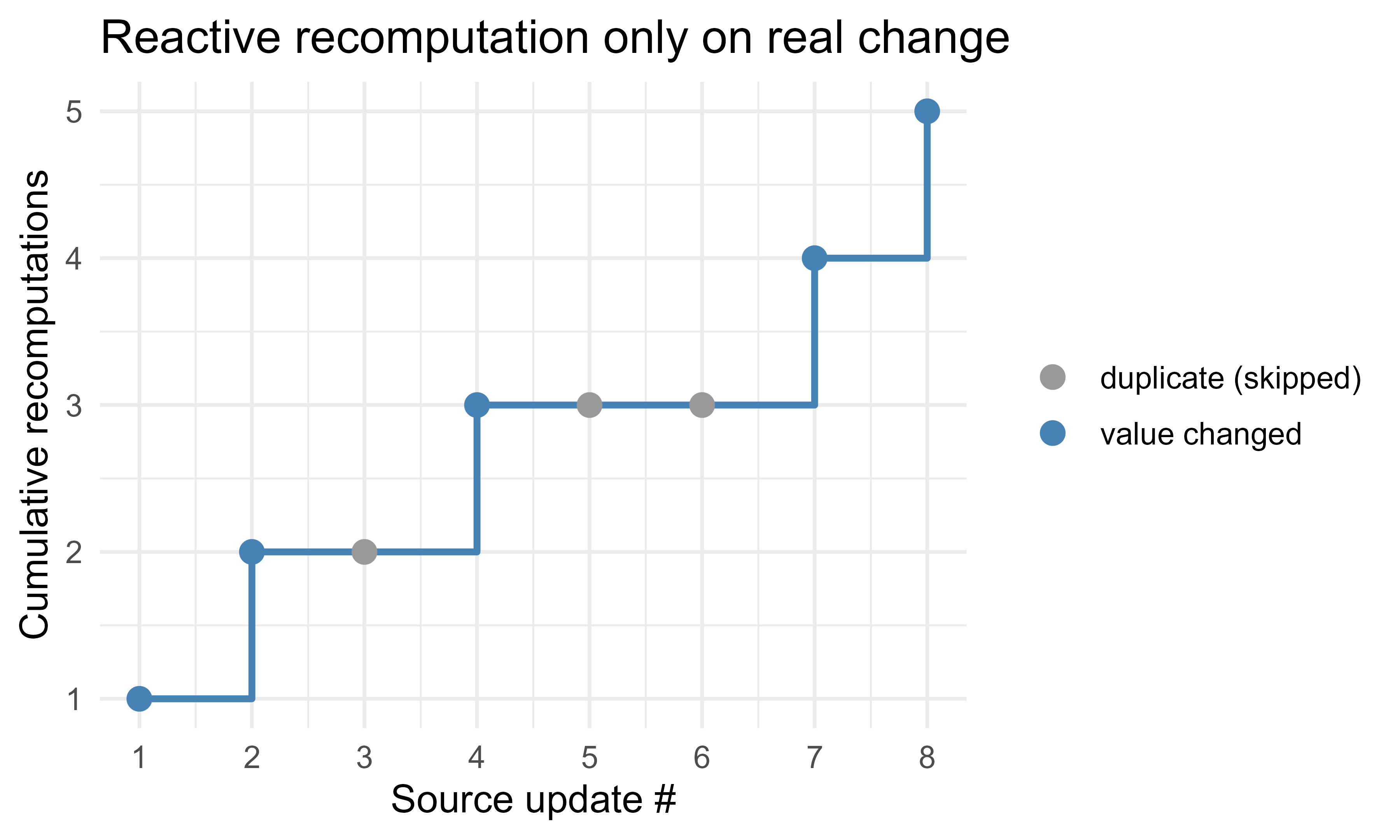
The observer ran once at subscription time, once for each genuine change, and was skipped when the new value equaled the old one. That last behavior is the base-R analogue of Shiny’s early stopping: propagation halts when a value does not actually change. The whole point is that you declare the relationship once in subscribe() and never call the conversion by hand again, which is what reactive programming buys you.
We can visualize how recomputations accumulate as a sequence of source updates arrives, including the duplicate that is skipped. Figure Figure 114.1 plots the running count of observer runs against the stream of writes, showing that only genuine changes advance the count.
Show code
library(ggplot2)# Replay a stream of writes and record whether each caused a recompute.temp<-make_reactive_value(20)events<-c(20, 21, 21, 23, 23, 23, 30, 18)# some duplicatesruns<-integer(0)temp$subscribe(function()runs[[length(runs)+1L]]<<-temp$get())cumulative<-integer(length(events))for(iinseq_along(events)){before<-length(runs)temp$set(events[i])cumulative[i]<-length(runs)}df<-data.frame( update =seq_along(events), written =events, recomputes =cumulative, changed =c(TRUE, events[-1]!=events[-length(events)]))ggplot(df, aes(update, recomputes))+geom_step(direction ="hv", color ="steelblue", linewidth =1)+geom_point(aes(color =changed), size =3)+scale_x_continuous(breaks =df$update)+scale_color_manual(values =c(`TRUE` ="steelblue", `FALSE` ="grey60"), labels =c(`TRUE` ="value changed", `FALSE` ="duplicate (skipped)"), name =NULL)+labs(x ="Source update #", y ="Cumulative recomputations", title ="Reactive recomputation only on real change")+theme_minimal(base_size =12)
Figure 114.1: Cumulative observer recomputations across a stream of source updates. The flat step marks a duplicate write that the value-equality check skips, so no recomputation occurs.
114.4 Integrating an LLM Backend
To turn a Shiny app into a chat application, the server needs to call a language model (see the large language models chapter, Chapter 40). The model almost never lives in the R process. It is reached over HTTP, either a hosted API (such as the Anthropic or OpenAI endpoints) or a model you run yourself behind an HTTP server. The R side is a thin client: build a request, send it, parse the response.
Intuition
The LLM is just another remote service, like a weather API or a payment gateway. Strip away the hype and the R code is the same shape you would write for any web service: assemble some JSON, send it, read the JSON that comes back. Everything model-specific lives on the server you are calling.
The cleanest way to do this in current R is the ellmer package, which wraps the major chat APIs behind one interface and handles message formatting, authentication, and streaming. Below is the idiomatic shape. It is eval=FALSE because ellmer is not installed in this build, but it is correct code a reader can run after install.packages("ellmer") and setting an API key.
Show code
library(ellmer)# The API key is read from an environment variable, never hard-coded.# Set ANTHROPIC_API_KEY in .Renviron or the deployment secret store.chat<-chat_anthropic( model ="claude-sonnet-4-5", system_prompt ="You are a concise data-science assistant.")# A single turn. chat$chat() sends the message and returns the reply text.reply<-chat$chat("Explain reactivity in one sentence.")cat(reply)
If you prefer to call an endpoint directly, the request is plain JSON over httr2 (the chapter on calling LLM APIs from R, Chapter 108, covers this in depth). The structure is the same for most providers: a list of messages, each with a role ("user", "assistant", or "system") and content, plus model and sampling parameters.
Show code
library(httr2)call_llm<-function(messages, model="claude-sonnet-4-5",max_tokens=1024){request("https://api.anthropic.com/v1/messages")|>req_headers("x-api-key"=Sys.getenv("ANTHROPIC_API_KEY"),"anthropic-version"="2023-06-01","content-type"="application/json")|>req_body_json(list( model =model, max_tokens =max_tokens, messages =messages))|>req_perform()|>resp_body_json()}# messages is a list of role/content pairs:msgs<-list(list(role ="user", content ="Hello"))# resp <- call_llm(msgs)# resp$content[[1]]$text
114.4.1 Conversation State
A chat is not a single call. Each request must carry the whole conversation so far, because the API itself is stateless: it has no memory between calls, so the application supplies the history every time. Let the conversation be an ordered list of messages \(m_1, m_2, \dots, m_n\), where each \(m_i = (r_i, c_i)\) pairs a role \(r_i\) with content \(c_i\). To produce turn \(n+1\) the app sends the full prefix \((m_1, \dots, m_n)\) and appends the model’s reply as \(m_{n+1}\).
This has a direct cost consequence. If turn \(t\) adds \(\ell_t\) tokens, then the number of input tokens billed across \(T\) turns grows quadratically:
because every earlier message is resent on every later turn. A long session resends its early messages many times.
Warning
That quadratic growth is easy to miss because each individual call looks cheap. A fifty-turn conversation can bill the first message fifty times. On a public app this is exactly how a small demo runs up a surprising invoice.
Two standard mitigations are truncation (drop or summarize old turns once the running token count exceeds a budget \(B\)) and prompt caching (have the provider cache a stable prefix so repeated tokens are billed at a reduced rate).2 In Shiny, the conversation lives in a reactiveVal so that appending a message invalidates the chat display and triggers a re-render.
Show code
server<-function(input, output, session){# Conversation history as a reactive value (a list of role/content pairs).history<-reactiveVal(list())append_msg<-function(role, content){history(c(history(), list(list(role =role, content =content))))}observeEvent(input$send, {req(input$user_msg)append_msg("user", input$user_msg)updateTextInput(session, "user_msg", value ="")# clear the boxreply<-call_llm(history())# send full historyappend_msg("assistant", reply$content[[1]]$text)})output$chat<-renderUI({lapply(history(), function(m){div(class =paste0("msg ", m$role), strong(m$role), p(m$content))})})}
114.4.2 Streaming Responses
Waiting for a full reply before showing anything feels slow. LLM APIs support streaming, where the response arrives as a sequence of small chunks (server-sent events), and the UI appends each chunk as it lands. The user sees text appear token by token instead of after a multi-second pause.
In Shiny, the clean approach is ExtendedTask (introduced in Shiny 1.8.1) combined with a streaming-capable client. ExtendedTask runs the call without blocking the rest of the app, and a reactiveVal holding the partial text is updated as chunks arrive, which re-renders the bubble each time.
Show code
library(shiny)library(ellmer)library(promises)server<-function(input, output, session){history<-reactiveVal(list())streaming_text<-reactiveVal("")chat<-chat_anthropic(model ="claude-sonnet-4-5")# ExtendedTask keeps the UI responsive while the model replies.reply_task<-ExtendedTask$new(function(prompt){# stream_async yields chunks; we accumulate and push to a reactiveVal.generator<-chat$stream_async(prompt)promises::promise(function(resolve, reject){acc<-""coro::async(function(){for(chunkincoro::await_each(generator)){acc<<-paste0(acc, chunk)streaming_text(acc)# partial update -> re-render}resolve(acc)})()})})observeEvent(input$send, {req(input$user_msg)history(c(history(), list(list(role ="user", content =input$user_msg))))streaming_text("")reply_task$invoke(input$user_msg)})# When the task finishes, commit the full reply to history.observeEvent(reply_task$result(), {history(c(history(),list(list(role ="assistant", content =reply_task$result()))))streaming_text("")})output$live<-renderText(streaming_text())output$chat<-renderUI(lapply(history(), function(m){div(class =m$role, p(m$content))}))}
The key structural point is non-blocking execution. A naive chat$chat() call inside an observer blocks the whole R process for that session, freezing every other control until the model finishes. ExtendedTask plus promises moves the wait off the reactive thread so the interface stays live, the stop button still works, and partial text keeps flowing.
Tip
If you only have one thing to add to a plain chat app, make it non-blocking. Streaming text is a nice touch, but a frozen interface during a multi-second model call is the difference users notice first.
114.4.3 Chat UI
You can hand-build the chat layout with divs and CSS, but the shinychat package provides a ready-made chat component (chat_ui() and chat_append()) that handles message bubbles, the input box, auto-scroll, and streaming display. It pairs directly with ellmer.
Show code
library(shiny)library(shinychat)library(ellmer)ui<-bslib::page_fluid(chat_ui("chat", placeholder ="Ask a data-science question..."))server<-function(input, output, session){chat<-chat_anthropic(model ="claude-sonnet-4-5")observeEvent(input$chat_user_input, {stream<-chat$stream_async(input$chat_user_input)chat_append("chat", stream)# appends streamed chunks to the UI})}shinyApp(ui, server)
114.5 Deployment
Once the app runs locally, it has to go somewhere others can reach. Table Table 114.2 lists the main options, roughly in order of effort.
Table 114.2: Deployment targets for a Shiny application, ordered roughly by effort, with their scaling model and notable trade-offs.
Target
What it is
Scaling model
Notes
shinyapps.io
Hosted service by Posit
Managed instances
Fastest path; secrets via dashboard
Posit Connect
Self-hosted/enterprise server
Managed, auth-aware
Adds access control, scheduling
Shiny Server (open source)
Self-hosted single server
Manual
Free; you manage the box
Docker + cloud
Container you build
Orchestrated (Kubernetes, ECS)
Most control; most work
shinylive
App compiled to WebAssembly
Runs in the browser
No R server; cannot hold API secrets
For an LLM app, two deployment facts dominate. First, never ship the API key in the app bundle. Read it from an environment variable or the platform’s secret store, and rotate it if it leaks. The shinylive option, which runs the app entirely in the browser, cannot keep a secret at all, so an LLM key would be exposed to every visitor; route those calls through a small server-side proxy instead.3 Second, concurrency: each Shiny session ties up an R process, and an LLM call can take seconds. Size the number of worker processes for the expected number of simultaneous users, and prefer the non-blocking ExtendedTask pattern so one slow call does not stall a worker that is serving several sessions.
Warning
The single most common security mistake in AI apps is committing an API key to source control. Once a key is in git history it is compromised even after you delete the line, treat it as leaked and rotate it. Keep keys in .Renviron (git-ignored) locally and in the platform secret store in production.
A container definition makes the runtime reproducible and is the usual unit of deployment on cloud platforms.
Show code
# Dockerfile (not R code; shown for completeness)# FROM rocker/shiny:4.4.3# RUN R -e "install.packages(c('shiny','ellmer','shinychat','bslib'))"# COPY app.R /srv/shiny-server/app/# EXPOSE 3838# # API key injected at runtime, never baked into the image:# # docker run -e ANTHROPIC_API_KEY=... -p 3838:3838 my-shiny-llm
114.6 Practical Guidance and Pitfalls
When to use Shiny. Reach for it when you need a human in the loop with a stateful, interactive interface: a chat assistant, a dashboard that wraps a model, a labeling or review tool, a what-if explorer. If the consumer is another program, a stateless plumber/vetiver API is simpler and scales better. If the output is a fixed report, Quarto is lighter.
Pitfalls specific to LLM apps:
Blocking the session. A synchronous API call freezes the app for that user. Use ExtendedTask and promises for any call that can take more than a moment.
Unbounded history. Conversation tokens grow quadratically (see the cost formula above). Cap or summarize history, and consider provider-side prompt caching for stable prefixes.
Leaking secrets. Keep keys in environment variables or a secret manager, out of source control and out of any browser-side bundle.
No error handling. Network calls fail, rate limits hit, the model returns malformed JSON. Wrap calls in tryCatch, show the user a clear message, and do not let one failed turn crash the session.
Reactivity misuse. Putting a side effect (an API call, a file write) inside a reactive() makes it run at unpredictable times and possibly more than once. Side effects belong in observe/observeEvent; values belong in reactive.
Cost surprises. Every turn is billed, retries included. Log token usage and set a per-session budget if the app is public.
General Shiny hygiene: use req() to short-circuit until inputs are ready, prefer reactive() for shared computations so they are not recomputed per output, and isolate values you want to read without creating a dependency with isolate().
To recap the arc of this chapter: a model becomes a product only when something wraps it in an interface, Shiny is the R way to build a stateful, interactive one, and its reactive engine, the same source-and-observer pattern we built by hand in base R, is what makes incremental updates like streaming chat natural. The LLM itself lives behind an HTTP call; the work on the R side is managing conversation state, keeping calls non-blocking, guarding secrets, and watching cost. Get those four right and the rest is layout.
114.7 Further Reading
Chang, W. and the Shiny authors. shiny: Web Application Framework for R. Package documentation and articles at shiny.posit.co.
Wickham, H. (2021). Mastering Shiny. O’Reilly. The standard reference on reactivity, modules, and application structure.
Sievert, C. (2020). Interactive Web-Based Data Visualization with R, plotly, and shiny. Chapman and Hall/CRC.
Fay, C., Rochette, S., Guyader, V., and Girard, C. (2021). Engineering Production-Grade Shiny Apps. Chapman and Hall/CRC. Deployment, scaling, and testing.
Posit. ellmer and shinychat package documentation, for current LLM client and chat-UI patterns in R.
Vaswani, A. et al. (2017). “Attention Is All You Need.” For the model architecture behind the LLM backends these apps call.
You never write HTML by hand. Functions like fluidPage and textInput return nested R structures that Shiny serializes into the page markup, so the layout is plain R you can build with loops, conditionals, and helper functions like any other code.↩︎
Prompt caching only helps when the prefix is byte-for-byte identical across calls, so put stable content, the system prompt and any fixed context, first, and append the changing turns after it.↩︎
Anything that reaches the browser is readable by the user: view-source, the network tab, and the WebAssembly bundle all expose it. The rule “the client cannot keep a secret” is not specific to Shiny; it applies to any browser-side code.↩︎
Source Code
# Building AI Applications with Shiny {#sec-ai-apps-shiny}```{r}#| include: falsesource("_common.R")```A trained model is not a product. The gap between a model object sitting in an Rsession and something a colleague can actually use is filled by an applicationlayer: a way to take input, run inference, and return a result. Shiny is theR framework for building that layer as an interactive web application, writtenentirely in R. This chapter shows how Shiny works, how its reactive programmingmodel maps onto serving a model, and how to wrap a large language model (LLM)backend in a chat interface that streams responses.The focus is practical. We treat Shiny as the deployment surface for the modelsbuilt earlier in this book, with special attention to the patterns that anLLM-powered application needs: managing conversation state, calling an externalinference API, streaming tokens back to the browser, and handling the failuremodes that come with network calls and paid endpoints. Because Shiny is not inthe set of packages we run live here, all Shiny code is shown with `eval=FALSE`.The reactive idea itself, which is the part most worth understanding, isdemonstrated with a small runnable observer pattern in base R.::: {.callout-important title="Key idea"}Shiny lets you declare *relationships* between values rather thanwriting a script that runs once from top to bottom. You say "this outputdepends on that input," and the framework figures out what to recompute whensomething changes. Holding that one idea in mind makes everything else in thischapter fall into place.:::By the end you will be able to read and reason about a Shiny app, explain why itsreactive engine is a natural fit for serving a model interactively, wrap an LLMbehind a chat interface that streams its reply, and avoid the cost andreliability traps that bite first-time builders of AI apps.## Where This Fits in an ML/AI WorkflowA typical workflow has three stages: training, packaging, and serving. Trainingproduces a model object. Packaging turns it into something callable behind astable interface (a function, an HTTP endpoint, or a serialized artifact).Serving exposes that interface to users or other systems. Shiny sits in theserving stage, but it is a specific kind of serving: a human-facing, stateful,interactive front end rather than a stateless machine-to-machine API.That distinction matters for AI applications. A REST API built with `plumber`(see the API chapter, @sec-api) answers one request at a time with no memorybetween calls. A chat applicationneeds the opposite: it must remember the conversation so far, react to each newmessage, and update the display incrementally as a response arrives. Shiny'sreactive model is built for exactly this kind of incremental, state-dependentupdate, which is why it has become a common choice for LLM demos, internaltools, and data-science dashboards that embed a model.@tbl-ai-apps-shiny-serving-options places Shiny among the servingoptions an R user is likely to reach for.| Tool | Interface | State | Best for | Limitation ||------|-----------|-------|----------|------------||`shiny`| Interactive web UI | Per-session, reactive | Dashboards, chat apps, human-in-the-loop tools | One R process per session can limit scale ||`plumber`| REST/HTTP API | Stateless | Model-as-a-service, microservices | No built-in UI ||`vetiver`| REST API + versioning | Stateless | MLOps, model registry and monitoring | Not for interactive UIs || RMarkdown/Quarto | Static or parameterized report | None | Reproducible reporting | Not interactive at runtime || Saved `.rds`/`qs`| In-process function | In-memory | Embedding in another R program | Not exposed to non-R users |: Serving options available to an R user, comparing their interface, state model, ideal use case, and main limitation. {#tbl-ai-apps-shiny-serving-options}A common production pattern combines these: `plumber` or `vetiver` serves themodel behind a stable API, and Shiny calls that API as a client. This keeps theheavy inference logic separate from the UI, lets the two scale independently, andmeans the same model endpoint can serve a Shiny app, a scheduled job, and anexternal consumer at once.::: {.callout-tip title="When to use this"}Choose Shiny when a human sits in the loop and thesession needs memory, a chat assistant, a labeling tool, a what-if dashboard.Choose `plumber` or `vetiver` when the consumer is another program and eachcall is independent. Choose Quarto when the deliverable is a fixed report. Thethree are complementary, not competitors.:::## Shiny ArchitectureA Shiny app has two halves: a user interface (UI) object that describes thelayout and inputs, and a server function that contains the logic. A call to`shinyApp(ui, server)` wires them together and starts the web server.```{r shiny-skeleton, eval=FALSE}library(shiny)ui <-fluidPage(titlePanel("Minimal Shiny app"),textInput("name", "Your name", value ="world"),textOutput("greeting"))server <-function(input, output, session) { output$greeting <-renderText({paste0("Hello, ", input$name, "!") })}shinyApp(ui, server)```The UI is just an R object that Shiny renders to HTML.^[You never write HTML byhand. Functions like `fluidPage` and `textInput` return nested R structures thatShiny serializes into the page markup, so the layout is plain R you can build withloops, conditionals, and helper functions like any other code.] Input widgets such as`textInput("name", ...)` create entries in the `input` list keyed by their id, so`input$name` holds whatever the user typed. Output placeholders such as`textOutput("greeting")` are filled by matching entries in the `output` list,which the server assigns with render functions. The `session` argument representsone connected browser tab and is where per-user state lives.### ReactivityThe piece that makes Shiny different from an ordinary script is reactivity.You do not write code that runs top to bottom once. You declare relationshipsbetween values, and Shiny re-runs the minimum amount of code needed when inputschange.::: {.callout-tip title="Intuition"}Think of a spreadsheet. When you change a cell, every formulathat refers to it updates automatically, and nothing else recalculates. Shinyworks the same way: inputs are the cells you type into, outputs are theformula cells, and the framework tracks which depends on which so it onlyrecomputes what is affected.:::There are three kinds of reactive objects:- Reactive sources are inputs. Reading `input$name` registers a dependency.- Reactive conductors, created with `reactive(...)`, are cached intermediate values that depend on sources and feed other reactives. They recompute only when something they depend on changes.- Reactive endpoints, created with `render*` functions or `observe(...)`, produce side effects such as updating the display.Formally, the dependencies form a directed acyclic graph $G = (V, E)$ where eachnode $v \in V$ is a reactive object and an edge $(u, v) \in E$ means $v$ read $u$during its last evaluation. When a source $s$ changes, Shiny marks every nodereachable from $s$ as invalid and schedules the invalid endpoints forre-execution. A conductor with value cache is recomputed only if it is read whileinvalid, which gives lazy evaluation: work that nobody observes is neverdone. If a node's recomputation produces the same value, propagation can stopearly, so an input change that does not actually alter a downstream value avoidsneedless redraws.The practical payoff: if a render block reads `input$a` and `input$b`, it re-runswhen either changes, and you never write the wiring by hand. The cost is that youhave to think in terms of dependencies rather than control flow, which is themain conceptual hurdle for newcomers.::: {.callout-note}The dependency edges are discovered at runtime, not declared inadvance. Shiny watches which reactive values a block actually reads while itexecutes, so a branch that is not taken creates no dependency. This is whatmakes the graph adapt as inputs change, but it also means a value you readonly inside an `if` will not trigger a re-run until that branch runs.:::### Reactive Expressions Versus ObserversThe two workhorses of the server function look similar but behave oppositely, andmixing them up is a frequent source of bugs. A `reactive()` returns a value and islazy: it runs only when read, and caches its result. An `observe()` (or`observeEvent()`) returns nothing, runs for its side effect, and is eager: it runswhenever its dependencies invalidate. Use a reactive to compute model inputs orpredictions you will display in several places; use an observer to write to a log,call an API for its effect, or update a stored state value.::: {.callout-warning}Do not put a side effect, an API call, a file write, a databaseupdate, inside a `reactive()`. Because reactives are lazy and cached, the sideeffect would fire at unpredictable times and possibly not at all. Values belongin `reactive()`; actions belong in `observe()`.:::```{r shiny-reactive, eval=FALSE}server <-function(input, output, session) {# Conductor: cached, lazy, recomputed when input$x changes. scaled <-reactive({req(input$x) # stop quietly until input$x exists (input$x - mean_x) / sd_x })# Endpoint: re-renders when scaled() changes. output$pred <-renderText({predict(model, newdata =data.frame(x =scaled())) })# Observer: side effect only, runs eagerly on button click.observeEvent(input$save, {saveRDS(scaled(), "last_input.rds") })}```## A Runnable Reactive Demo in Base RTo make the dependency idea concrete without Shiny, we build a tiny reactivesystem in base R. It has reactive values that notify dependents when theychange, and observers that re-run when a value they read becomes invalid.This is the same source-and-endpoint pattern Shiny uses, stripped to itsessentials so it runs in a plain R session.```{r reactive-sim}# A minimal reactive system: values that notify, observers that react.make_reactive_value <-function(initial) { state <-new.env(parent =emptyenv()) state$value <- initial state$observers <-list() # functions to call when value changes get <-function() state$value set <-function(new_value) {if (!identical(new_value, state$value)) { state$value <- new_value# Invalidate: re-run each dependent observer.for (obs in state$observers) obs() }invisible(new_value) } subscribe <-function(obs) { state$observers <-c(state$observers, obs)obs() # eager first run, like Shiny observersinvisible(NULL) }list(get = get, set = set, subscribe = subscribe)}# Build a small dependency graph:# temperature_c -> observer that prints Fahrenheit and logs a count.temperature_c <-make_reactive_value(20)recompute_count <-0Ltemperature_c$subscribe(function() { recompute_count <<- recompute_count +1L f <- temperature_c$get() *9/5+32cat(sprintf("[recompute %d] %.1f C = %.1f F\n", recompute_count, temperature_c$get(), f))})# Changing the source triggers the observer automatically.temperature_c$set(25)temperature_c$set(100)# Setting to the same value does NOT recompute (value-equality short-circuit).temperature_c$set(100)cat("Total recomputations:", recompute_count, "\n")```The observer ran once at subscription time, once for each genuine change, and wasskipped when the new value equaled the old one. That last behavior is thebase-R analogue of Shiny's early stopping: propagation halts when a value doesnot actually change. The whole point is that you declare the relationship once in`subscribe()` and never call the conversion by hand again, which is what reactiveprogramming buys you.We can visualize how recomputations accumulate as a sequence of source updatesarrives, including the duplicate that is skipped. Figure@fig-ai-apps-shiny-reactive-recompute plots the running count of observerruns against the stream of writes, showing that only genuine changes advance thecount.```{r fig-ai-apps-shiny-reactive-recompute, fig.cap="Cumulative observer recomputations across a stream of source updates. The flat step marks a duplicate write that the value-equality check skips, so no recomputation occurs.", fig.width=6, fig.height=3.6}library(ggplot2)# Replay a stream of writes and record whether each caused a recompute.temp <-make_reactive_value(20)events <-c(20, 21, 21, 23, 23, 23, 30, 18) # some duplicatesruns <-integer(0)temp$subscribe(function() runs[[length(runs) +1L]] <<- temp$get())cumulative <-integer(length(events))for (i inseq_along(events)) { before <-length(runs) temp$set(events[i]) cumulative[i] <-length(runs)}df <-data.frame(update =seq_along(events),written = events,recomputes = cumulative,changed =c(TRUE, events[-1] != events[-length(events)]))ggplot(df, aes(update, recomputes)) +geom_step(direction ="hv", color ="steelblue", linewidth =1) +geom_point(aes(color = changed), size =3) +scale_x_continuous(breaks = df$update) +scale_color_manual(values =c(`TRUE`="steelblue", `FALSE`="grey60"),labels =c(`TRUE`="value changed",`FALSE`="duplicate (skipped)"),name =NULL) +labs(x ="Source update #", y ="Cumulative recomputations",title ="Reactive recomputation only on real change") +theme_minimal(base_size =12)```## Integrating an LLM BackendTo turn a Shiny app into a chat application, the server needs to call a languagemodel (see the large language models chapter, @sec-llms). The model almost neverlives in the R process. It is reached over HTTP,either a hosted API (such as the Anthropic or OpenAI endpoints) or a model yourun yourself behind an HTTP server. The R side is a thin client: build a request,send it, parse the response.::: {.callout-tip title="Intuition"}The LLM is just another remote service, like a weather API or apayment gateway. Strip away the hype and the R code is the same shape you wouldwrite for any web service: assemble some JSON, send it, read the JSON that comesback. Everything model-specific lives on the server you are calling.:::The cleanest way to do this in current R is the `ellmer` package, which wraps themajor chat APIs behind one interface and handles message formatting,authentication, and streaming. Below is the idiomatic shape. It is `eval=FALSE`because `ellmer` is not installed in this build, but it is correct code a readercan run after `install.packages("ellmer")` and setting an API key.```{r ellmer-basic, eval=FALSE}library(ellmer)# The API key is read from an environment variable, never hard-coded.# Set ANTHROPIC_API_KEY in .Renviron or the deployment secret store.chat <-chat_anthropic(model ="claude-sonnet-4-5",system_prompt ="You are a concise data-science assistant.")# A single turn. chat$chat() sends the message and returns the reply text.reply <- chat$chat("Explain reactivity in one sentence.")cat(reply)```If you prefer to call an endpoint directly, the request is plain JSON over`httr2` (the chapter on calling LLM APIs from R, @sec-llm-apis-r, covers this indepth). The structure is the same for most providers: a list of messages, eachwith a `role` (`"user"`, `"assistant"`, or `"system"`) and `content`, plus modeland sampling parameters.```{r httr2-call, eval=FALSE}library(httr2)call_llm <-function(messages, model ="claude-sonnet-4-5",max_tokens =1024) {request("https://api.anthropic.com/v1/messages") |>req_headers("x-api-key"=Sys.getenv("ANTHROPIC_API_KEY"),"anthropic-version"="2023-06-01","content-type"="application/json" ) |>req_body_json(list(model = model,max_tokens = max_tokens,messages = messages )) |>req_perform() |>resp_body_json()}# messages is a list of role/content pairs:msgs <-list(list(role ="user", content ="Hello"))# resp <- call_llm(msgs)# resp$content[[1]]$text```### Conversation StateA chat is not a single call. Each request must carry the whole conversation sofar, because the API itself is stateless: it has no memory between calls, so theapplication supplies the history every time. Let the conversation be an orderedlist of messages $m_1, m_2, \dots, m_n$, where each $m_i = (r_i, c_i)$ pairs arole $r_i$ with content $c_i$. To produce turn $n+1$ the app sends the fullprefix $(m_1, \dots, m_n)$ and appends the model's reply as $m_{n+1}$.This has a direct cost consequence. If turn $t$ adds $\ell_t$ tokens, then thenumber of input tokens billed across $T$ turns grows quadratically:$$\text{total input tokens} = \sum_{t=1}^{T} \sum_{i=1}^{t-1} \ell_i= \sum_{i=1}^{T-1} (T - i)\,\ell_i,$$because every earlier message is resent on every later turn. A long sessionresends its early messages many times.::: {.callout-warning}That quadratic growth is easy to miss because each individual calllooks cheap. A fifty-turn conversation can bill the first message fifty times.On a public app this is exactly how a small demo runs up a surprising invoice.:::Two standard mitigations are truncation (drop or summarize old turns once therunning token count exceeds a budget $B$) and prompt caching (have theprovider cache a stable prefix so repeated tokens are billed at a reducedrate).^[Prompt caching only helps when the prefix is byte-for-byte identicalacross calls, so put stable content, the system prompt and any fixed context,first, and append the changing turns after it.] In Shiny, the conversation livesin a `reactiveVal` so that appending a message invalidates the chat display andtriggers a re-render.```{r shiny-state, eval=FALSE}server <-function(input, output, session) {# Conversation history as a reactive value (a list of role/content pairs). history <-reactiveVal(list()) append_msg <-function(role, content) {history(c(history(), list(list(role = role, content = content)))) }observeEvent(input$send, {req(input$user_msg)append_msg("user", input$user_msg)updateTextInput(session, "user_msg", value ="") # clear the box reply <-call_llm(history()) # send full historyappend_msg("assistant", reply$content[[1]]$text) }) output$chat <-renderUI({lapply(history(), function(m) {div(class =paste0("msg ", m$role), strong(m$role), p(m$content)) }) })}```### Streaming ResponsesWaiting for a full reply before showing anything feels slow. LLM APIs supportstreaming, where the response arrives as a sequence of small chunks (server-sentevents), and the UI appends each chunk as it lands. The user sees text appeartoken by token instead of after a multi-second pause.In Shiny, the clean approach is `ExtendedTask` (introduced in Shiny 1.8.1)combined with a streaming-capable client. `ExtendedTask` runs the call withoutblocking the rest of the app, and a `reactiveVal` holding the partial text isupdated as chunks arrive, which re-renders the bubble each time.```{r shiny-stream, eval=FALSE}library(shiny)library(ellmer)library(promises)server <-function(input, output, session) { history <-reactiveVal(list()) streaming_text <-reactiveVal("") chat <-chat_anthropic(model ="claude-sonnet-4-5")# ExtendedTask keeps the UI responsive while the model replies. reply_task <- ExtendedTask$new(function(prompt) {# stream_async yields chunks; we accumulate and push to a reactiveVal. generator <- chat$stream_async(prompt) promises::promise(function(resolve, reject) { acc <-"" coro::async(function() {for (chunk in coro::await_each(generator)) { acc <<-paste0(acc, chunk)streaming_text(acc) # partial update -> re-render }resolve(acc) })() }) })observeEvent(input$send, {req(input$user_msg)history(c(history(), list(list(role ="user", content = input$user_msg))))streaming_text("") reply_task$invoke(input$user_msg) })# When the task finishes, commit the full reply to history.observeEvent(reply_task$result(), {history(c(history(),list(list(role ="assistant", content = reply_task$result()))))streaming_text("") }) output$live <-renderText(streaming_text()) output$chat <-renderUI(lapply(history(), function(m) {div(class = m$role, p(m$content)) }))}```The key structural point is non-blocking execution. A naive `chat$chat()` callinside an observer blocks the whole R process for that session, freezing everyother control until the model finishes. `ExtendedTask` plus `promises` moves thewait off the reactive thread so the interface stays live, the stop button stillworks, and partial text keeps flowing.::: {.callout-tip}If you only have one thing to add to a plain chat app, make itnon-blocking. Streaming text is a nice touch, but a frozen interface during amulti-second model call is the difference users notice first.:::### Chat UIYou can hand-build the chat layout with `div`s and CSS, but the `shinychat`package provides a ready-made chat component (`chat_ui()` and `chat_append()`)that handles message bubbles, the input box, auto-scroll, and streaming display.It pairs directly with `ellmer`.```{r shinychat, eval=FALSE}library(shiny)library(shinychat)library(ellmer)ui <- bslib::page_fluid(chat_ui("chat", placeholder ="Ask a data-science question..."))server <-function(input, output, session) { chat <-chat_anthropic(model ="claude-sonnet-4-5")observeEvent(input$chat_user_input, { stream <- chat$stream_async(input$chat_user_input)chat_append("chat", stream) # appends streamed chunks to the UI })}shinyApp(ui, server)```## DeploymentOnce the app runs locally, it has to go somewhere others can reach. Table@tbl-ai-apps-shiny-deployment-targets lists the main options, roughly inorder of effort.| Target | What it is | Scaling model | Notes ||--------|------------|---------------|-------||`shinyapps.io`| Hosted service by Posit | Managed instances | Fastest path; secrets via dashboard || Posit Connect | Self-hosted/enterprise server | Managed, auth-aware | Adds access control, scheduling || Shiny Server (open source) | Self-hosted single server | Manual | Free; you manage the box || Docker + cloud | Container you build | Orchestrated (Kubernetes, ECS) | Most control; most work ||`shinylive`| App compiled to WebAssembly | Runs in the browser | No R server; cannot hold API secrets |: Deployment targets for a Shiny application, ordered roughly by effort, with their scaling model and notable trade-offs. {#tbl-ai-apps-shiny-deployment-targets}For an LLM app, two deployment facts dominate. First, **never ship the API key inthe app bundle**. Read it from an environment variable or the platform's secretstore, and rotate it if it leaks. The `shinylive` option, which runs the appentirely in the browser, cannot keep a secret at all, so an LLM key would beexposed to every visitor; route those calls through a small server-side proxyinstead.^[Anything that reaches the browser is readable by the user: view-source,the network tab, and the WebAssembly bundle all expose it. The rule "the clientcannot keep a secret" is not specific to Shiny; it applies to any browser-sidecode.] Second, concurrency: each Shiny session ties up an R process, and anLLM call can take seconds. Size the number of worker processes for the expectednumber of simultaneous users, and prefer the non-blocking `ExtendedTask` patternso one slow call does not stall a worker that is serving several sessions.::: {.callout-warning}The single most common security mistake in AI apps is committingan API key to source control. Once a key is in git history it is compromisedeven after you delete the line, treat it as leaked and rotate it. Keep keys in`.Renviron` (git-ignored) locally and in the platform secret store inproduction.:::A container definition makes the runtime reproducible and is the usual unit ofdeployment on cloud platforms.```{r dockerfile, eval=FALSE}# Dockerfile (not R code; shown for completeness)# FROM rocker/shiny:4.4.3# RUN R -e "install.packages(c('shiny','ellmer','shinychat','bslib'))"# COPY app.R /srv/shiny-server/app/# EXPOSE 3838# # API key injected at runtime, never baked into the image:# # docker run -e ANTHROPIC_API_KEY=... -p 3838:3838 my-shiny-llm```## Practical Guidance and PitfallsWhen to use Shiny. Reach for it when you need a human in the loop with astateful, interactive interface: a chat assistant, a dashboard that wraps a model,a labeling or review tool, a what-if explorer. If the consumer is another program,a stateless `plumber`/`vetiver` API is simpler and scales better. If the outputis a fixed report, Quarto is lighter.Pitfalls specific to LLM apps:- *Blocking the session.* A synchronous API call freezes the app for that user. Use `ExtendedTask` and `promises` for any call that can take more than a moment.- *Unbounded history.* Conversation tokens grow quadratically (see the cost formula above). Cap or summarize history, and consider provider-side prompt caching for stable prefixes.- *Leaking secrets.* Keep keys in environment variables or a secret manager, out of source control and out of any browser-side bundle.- *No error handling.* Network calls fail, rate limits hit, the model returns malformed JSON. Wrap calls in `tryCatch`, show the user a clear message, and do not let one failed turn crash the session.- *Reactivity misuse.* Putting a side effect (an API call, a file write) inside a`reactive()` makes it run at unpredictable times and possibly more than once. Side effects belong in `observe`/`observeEvent`; values belong in `reactive`.- *Cost surprises.* Every turn is billed, retries included. Log token usage and set a per-session budget if the app is public.General Shiny hygiene: use `req()` to short-circuit until inputs are ready,prefer `reactive()` for shared computations so they are not recomputed per output,and isolate values you want to read without creating a dependency with`isolate()`.To recap the arc of this chapter: a model becomes a product only when somethingwraps it in an interface, Shiny is the R way to build a stateful, interactive one,and its reactive engine, the same source-and-observer pattern we built by hand inbase R, is what makes incremental updates like streaming chat natural. The LLMitself lives behind an HTTP call; the work on the R side is managing conversationstate, keeping calls non-blocking, guarding secrets, and watching cost. Get thosefour right and the rest is layout.## Further Reading- Chang, W. and the Shiny authors. *shiny: Web Application Framework for R.* Package documentation and articles at shiny.posit.co.- Wickham, H. (2021). *Mastering Shiny.* O'Reilly. The standard reference on reactivity, modules, and application structure.- Sievert, C. (2020). *Interactive Web-Based Data Visualization with R, plotly, and shiny.* Chapman and Hall/CRC.- Fay, C., Rochette, S., Guyader, V., and Girard, C. (2021). *Engineering Production-Grade Shiny Apps.* Chapman and Hall/CRC. Deployment, scaling, and testing.- Posit. *ellmer* and *shinychat* package documentation, for current LLM client and chat-UI patterns in R.- Vaswani, A. et al. (2017). "Attention Is All You Need." For the model architecture behind the LLM backends these apps call.