Building a predictive model is rarely a single fit. You try different feature sets, different learners, different hyperparameters, different random seeds, and you do this over days or weeks, often with several people touching the same project. Without a system that records what you did, you lose the ability to answer basic questions: Which run produced the model now serving predictions? What learning rate did it use? Was it trained on the data from before or after the schema change last month?
Most chapters in this book are about how to fit a model well. This one is about how to remember what you fit, which turns out to be just as important once a model leaves your laptop and starts making decisions someone depends on. The mental shift is small but freeing: instead of treating each fit as a throwaway command, you treat it as an event worth recording, the way a lab scientist keeps a notebook. By the end you will know what to record, why an append-only log is the right data structure for it, how the main R tools (MLflow, pins, vetiver) implement that idea, and how to reproduce the whole thing in 30 lines of base R.
Intuition
Think of experiment tracking as a lab notebook for model fitting. You would never trust a chemistry result that nobody wrote down. A model result deserves the same discipline.
Experiment tracking is the practice of recording, for every model fit (a “run”1), three kinds of information:
Parameters: the inputs you chose, such as the learner, hyperparameters, feature recipe, and data version.
Metrics: the numbers that came out, such as cross-validated RMSE, AUC, log loss, or training time.
Artifacts: the files produced, such as the serialized model object, plots, a preprocessing recipe, and an environment lockfile.
These three categories answer, respectively, “what did I do,” “how well did it work,” and “where are the results.” Keeping them together for every run is what later lets you compare fits at a glance and rebuild any one of them on demand.
A model registry is the downstream half of this story. Once you have many runs, you promote chosen models into a versioned store with named stages (for example, staging and production), so that a serving system can ask for “the current production model” without knowing which run created it. Lineage ties the two together: given a deployed model, you can trace back to the run, the parameters, the code commit, and the data version that produced it.2
Key idea
Tracking, registry, and lineage are three views of one append-only record. Tracking writes runs, the registry promotes a chosen run’s model under a stable name, and lineage reads the record backward from a deployed model to its origin.
This chapter covers the concepts and the main R tooling: MLflow for tracking, and the tidymodels-adjacent stack of pins (a versioned model board) and vetiver (model deployment objects and metadata; the broader serving story is the subject of the model deployment chapter, Chapter 116). Most of these packages are not installed in this environment, so their chunks are shown with eval=FALSE but written as correct, current code. The runnable demonstration is a minimal experiment logger written in base R that records parameters and metrics to a data.frame, persists them to CSV, and queries for the best run. That demo is enough to teach the core idea: tracking is, at bottom, an append-only log plus a query.
115.2 The underlying structure
115.2.1 A run as a record
It helps to be precise about what we are storing. Index runs by \(r = 1, 2, \dots, R\). Each run is a tuple
\(\theta_r \in \Theta\) is the vector of parameters (hyperparameters and configuration choices) drawn from a parameter space \(\Theta\),
\(m_r \in \mathbb{R}^q\) is the vector of \(q\) recorded metrics,
\(a_r\) is a set of artifact references (paths or hashes), and
\(c_r\) is context metadata: a timestamp, a code commit hash, a data version, and the identity of the person or process that launched the run.
The collection \(\{\text{run}_r\}_{r=1}^{R}\) is an append-only log. We never edit a past run; we only add new ones. This is what makes the system trustworthy: the record of what happened does not change after the fact.
Note
“Append-only” is the whole game. If you allow yourself to go back and tweak a past metric, the log stops being evidence of what happened and becomes a story you are telling about it. Every tool in this chapter enforces, or at least encourages, append-only writes.
115.2.2 Selecting the best run
Model selection is then an optimization over the log. If \(g(\cdot)\) is the metric we care about (say validation RMSE, where smaller is better), the chosen run is
For a metric where larger is better (accuracy, AUC), replace \(\min\) with \(\max\). This is just a query over the log, and it is exactly what the demo below implements. Notice that nothing here requires special infrastructure: once the runs are stored in a table, “find the best model” is a single sort.
Warning
The run you select on and the number you report should not come from the same data. Picking \(r^\star\) on a holdout set and then quoting that same holdout RMSE as the model’s performance flatters the result, because you chose the run that happened to look best on exactly those points. Select on validation, report on a test set you touch once. We return to this in the pitfalls section.
115.2.3 Why a hash matters for lineage
To make lineage verifiable rather than aspirational, we want a fingerprint of each artifact that changes whenever the bytes change. A hash function3\(H\) maps an artifact \(a\) to a fixed-length digest \(H(a)\) with the property that, in practice, \(a \neq a' \Rightarrow H(a) \neq H(a')\). Storing \(H(a_r)\) alongside the run lets a serving system confirm that the file it loaded is byte-for-byte the file that the run recorded. pins uses content hashing internally for exactly this reason, and the same idea underlies data-version checks.
Intuition
A hash is a tamper-evident seal. If two files share a hash they are (for practical purposes) the same file, and if the hashes differ something changed. That is enough to catch a silently swapped model or a corrupted download.
Those three pieces, a run as a record, selection as a query, and a hash for verification, are everything the heavier tools build on. With the structure in hand, we can compare the tools that implement it.
115.3 Comparison of tools
The R ecosystem offers several tools that overlap in places. Table 115.1 positions them by primary job.
Table 115.1: R tools for experiment tracking, model versioning, and deployment, positioned by primary job and capabilities.
Tool
Primary job
Stores params/metrics
Stores model artifacts
Versioning
Serving support
Typical use
MLflow (via mlflow R pkg)
Track runs, registry, UI
Yes
Yes
Runs and registered models
Via MLflow models
Team experiment tracking with a server and web UI
pins
Versioned object board
No (object only)
Yes (any R object)
Automatic per-write versions
Indirect (board feeds vetiver)
Sharing and versioning models/data across people
vetiver
Deployable model object
Metadata + metrics
Yes (pinned)
Through the pins board
Yes (plumber/Docker REST API)
Turning a trained model into a versioned API
tidymodels tune
Hyperparameter search log
Yes (in tibbles)
In-memory or extracted
Within a tuning object
No
Recording metrics across a tuning grid
Base-R logger (this chapter)
Minimal append-only log
Yes
By path reference
Manual (timestamps/ids)
No
Teaching, tiny projects, audit trail with no dependencies
The rows are not competitors so much as stages of one pipeline. A common production pattern combines them: use tune (introduced in the tidymodels chapter, Chapter 90, and extended in the tuning and stacking chapter, Chapter 93) to search, log everything to MLflow during development, then convert the final fit to a vetiver object and pin it to a board that the serving API reads from.
When to use this
Reach for the base-R logger or a tune tibble for a solo, short-lived analysis; MLflow when a team needs a shared UI and a registry; pins plus vetiver when the deliverable is a served model that needs versioning and rollback. The next three sections show each in turn.
115.4 MLflow in R (eval=FALSE)
MLflow is the most widely used open-source tracking server, and it is a faithful instance of the structure above: it stores runs, gives them a web UI, and adds a registry. It organizes work into experiments, and each experiment holds runs. The R interface mirrors the Python one: open a run, log parameters and metrics, log artifacts, and the run closes automatically. The loop below fits lasso at four penalty values and logs each fit as its own run.
Note
The chunks in this section and the next use eval=FALSE because MLflow, pins, and vetiver are not installed in this build environment, and the MLflow examples also assume a tracking server and an ames_train object. The code is correct and current; it is shown for reading rather than executed here.
Show code
library(mlflow)library(glmnet)# Point at a tracking server, or omit to use a local ./mlruns directory.# mlflow_set_tracking_uri("http://127.0.0.1:5000")mlflow_set_experiment("ames-lasso")x<-model.matrix(Sale_Price~., data =ames_train)[, -1]y<-ames_train$Sale_Pricefor(lambdainc(0.01, 0.1, 1, 10)){with(mlflow_start_run(), {fit<-glmnet(x, y, alpha =1, lambda =lambda)preds<-as.numeric(predict(fit, newx =x))rmse<-sqrt(mean((y-preds)^2))mlflow_log_param("alpha", 1)mlflow_log_param("lambda", lambda)mlflow_log_metric("train_rmse", rmse)saveRDS(fit, "model.rds")mlflow_log_artifact("model.rds")})}# Programmatic query for the best run in the experiment.runs<-mlflow_search_runs(experiment_ids =mlflow_get_experiment()$experiment_id)runs[which.min(runs$`metrics.train_rmse`), c("run_id", "params.lambda", "metrics.train_rmse")]
Run mlflow ui from the shell to browse the same records in a browser. Once a run looks good, register its model so serving can refer to it by name and stage.
Show code
# Register a model version from a finished run, then promote it.mlflow_register_model( model_uri ="runs:/<run_id>/model", name ="ames_price_model")# Move the new version to the production stage (older tooling uses stages;# newer MLflow uses aliases such as @champion via mlflow_set_registered_model_alias).mlflow_transition_model_version_stage( name ="ames_price_model", version =1, stage ="Production")
115.5 pins as a model board, and vetiver for deployment (eval=FALSE)
Where MLflow tracks the search, pins and vetiver handle the deliverable. pins treats a storage location (a local folder, S3, Azure, Posit Connect) as a board and versions every write automatically. vetiver wraps a trained model with the metadata needed to serve and monitor it (drift detection is taken up in the model monitoring chapter, Chapter 117), then pins it. The flow is: fit a model, wrap it as a vetiver object, write it to a board (creating a version), and stand up a REST API that reads from that board.
Show code
library(pins)library(vetiver)library(parsnip)# A board is any storage backend; this one is a local folder.board<-board_folder(path ="~/model-board", versioned =TRUE)fit<-linear_reg()|>fit(Sale_Price~Gr_Liv_Area+Year_Built, data =ames_train)# A vetiver object captures the model plus a prediction signature and metadata.v<-vetiver_model(fit, model_name ="ames_price_model")# Writing creates a new immutable version each time.vetiver_pin_write(board, v)# Versions are listed with content hashes; you can read any specific one.pin_versions(board, "ames_price_model")v_old<-vetiver_pin_read(board, "ames_price_model", version ="<version-id>")# Turn the pinned model into a REST API and (optionally) a Dockerfile.library(plumber)pr()|>vetiver_api(v)|>pr_run(port =8088)vetiver_prepare_docker(board, "ames_price_model", docker_args =list(port =8088))
The key property is that vetiver_pin_write() does not overwrite. Each write is a new version with its own hash, so a serving process pointed at the board can pin to a known version, and rollback is just reading an earlier one. This is the lineage chain in practice: deployed API to pinned version to model object to the run metadata stored inside the vetiver object.
Tip
Rollback is the feature people underestimate until they need it. Because every write is a new immutable version, recovering from a bad deploy is vetiver_pin_read(board, name, version = "<previous>"), not a frantic re-train. Pin the serving API to an explicit version rather than “latest” so a new write never changes production behavior by surprise.
115.6 A runnable base-R experiment logger (eval=TRUE)
The dependencies above are powerful but heavy, and they can hide how simple the core idea is. The whole contract, append a record and query it, fits in a few base-R functions. We build a logger with exactly three pieces: log_run() appends a run to a CSV, read_runs() reads the log back, and best_run() runs the \(\arg\min\) query. This needs nothing but base R, so unlike the sections above it actually executes here.
Intuition
If you understand the next three functions, you understand MLflow. The commercial tools add a UI, concurrent writes, hashing, and a registry, but the beating heart is still “append a row, then sort the table.”
Now we use it. We fit ridge regression at several penalty values on a simulated regression problem, logging the penalty \(\lambda\) as a parameter and the holdout RMSE as a metric.4 The point is not the model; it is that every fit leaves a durable record we can query later, even after the R session that produced it is gone.
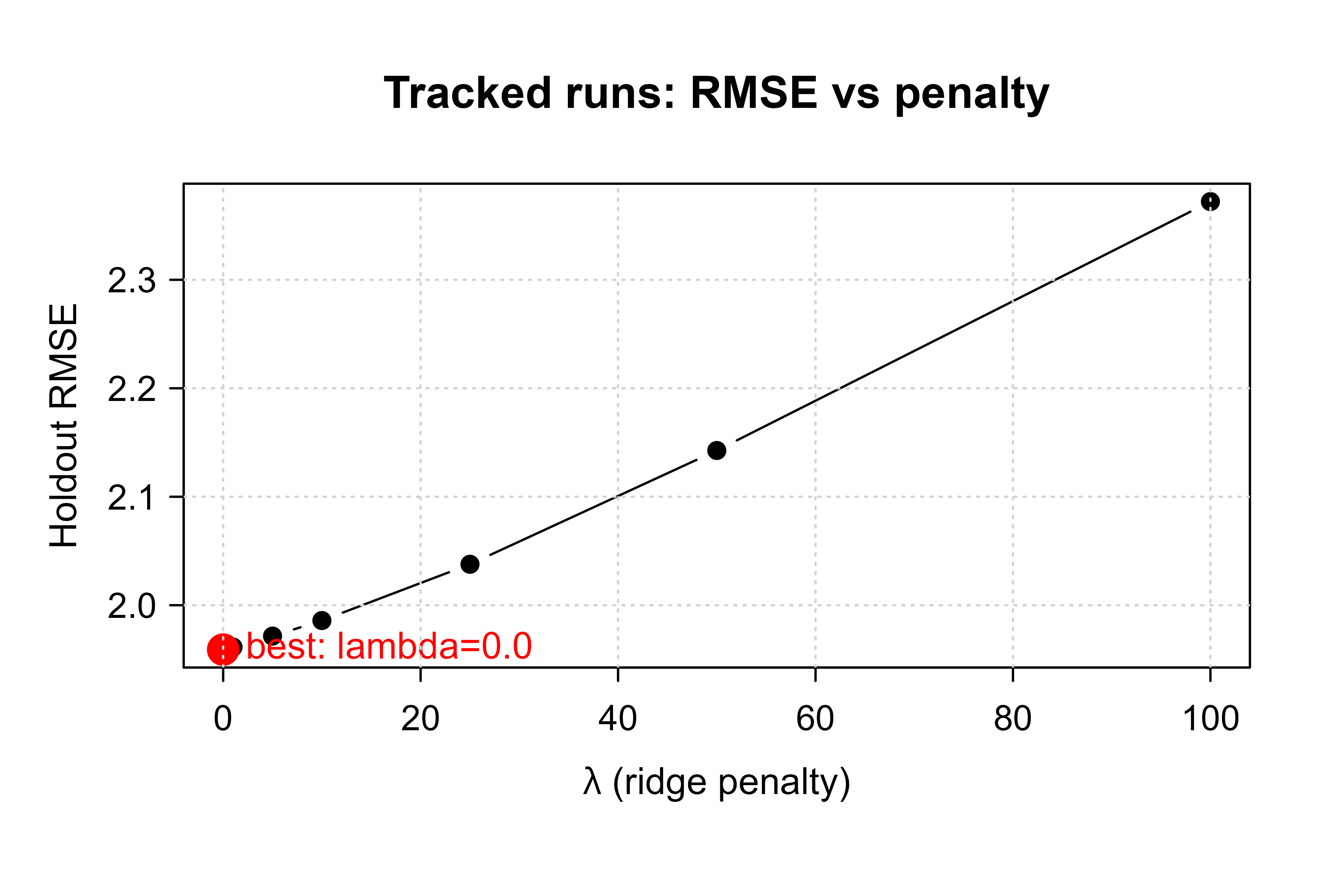
Because the log is just a data.frame, plotting the metric against a parameter is a one-liner. This is the everyday payoff of tracking: the comparison plot comes from records, not from rerunning anything. Figure 115.1 shows the holdout RMSE traced across the ridge penalties we logged, with the selected run highlighted.
Show code
runs<-read_runs(logfile)best<-runs[which.min(runs$test_rmse), ]plot(runs$lambda, runs$test_rmse, type ="b", pch =19, xlab =expression(lambda~"(ridge penalty)"), ylab ="Holdout RMSE", main ="Tracked runs: RMSE vs penalty")points(best$lambda, best$test_rmse, col ="red", pch =19, cex =1.8)text(best$lambda, best$test_rmse, labels =sprintf("best: lambda=%.1f", best$lambda), pos =4, col ="red")grid()
Figure 115.1: Holdout RMSE versus ridge penalty, read back from the experiment log. The red point marks the best run.
This 30-line logger is obviously missing what MLflow and pins provide: a web UI, safe concurrent writes from many users, artifact hashing, and a registry with stages. But it captures the essential contract, an append-only record plus a query, and it makes clear that the heavier tools are conveniences layered on that contract, not a different idea. If you ever find a tracking tool confusing, ask what it is doing in terms of these three functions, and it usually becomes obvious.
With the mechanism understood, the rest of the work is discipline. The next section collects the habits that separate a log you can trust from one you only think you can.
115.7 Practical guidance and pitfalls
A tracking system is only as good as the habits around it. The failures here are rarely dramatic; they are quiet gaps that go unnoticed until the day you need to reproduce a result and cannot. The guidelines below are ordered roughly from “what to record” to “how to act on the record,” and each one closes a specific gap.
Log parameters at the moment of use, not from memory. Record the exact value passed to the fit. If a default changes between package versions, a parameter you assumed was logged “implicitly” silently shifts. Log it explicitly.
Version the data, not just the model. A run is only reproducible if you know which data produced it. Store a data version identifier (a snapshot id, a partition date, or a hash of the input) as a parameter. Lineage that stops at the model is half a chain.
Record the environment. Two identical scripts can produce different numbers under different package versions. Save a lockfile (for example with renv::snapshot()) as an artifact, or at minimum log sessionInfo(). Without this, “it worked last quarter” is unverifiable.
Set seeds and log them. Randomness in resampling, initialization, and subsampling makes metrics vary run to run. Log the seed as a parameter so a result can be reproduced exactly.
Do not overwrite, ever. The value of tracking comes from the log being append-only. Tools that version automatically (pins, MLflow) enforce this; a hand-rolled logger must be disciplined about it. Editing a past metric to “fix” it destroys the audit trail.
Separate the metric you select on from the metric you report. Choosing \(r^\star\) by the same holdout set you later quote as performance biases the reported number optimistically. Select on a validation split or cross-validation, and report on a test set touched only once.
Promote deliberately. A model in the registry’s production stage is a contract with whatever consumes it. Gate promotion behind a check (does the new version beat the current production version on a frozen evaluation set?) rather than promoting whatever finished most recently.
Warning
The single most common reproducibility failure is the unlogged default. You set a learning rate explicitly but rely on the package default for everything else; a year later the package updates, the default shifts, and your “reproduced” run quietly produces different numbers. Logging only what you typed is not the same as logging what was used.
Taken together, these habits turn a pile of model fits into a record you can defend. The good news from the base-R demo is that the mechanism is trivial; the discipline is the hard part, and it is entirely within your control.
115.8 Further reading
Chen, A., Chow, A., et al. (2020). Developments in MLflow: A System to Accelerate the Machine Learning Lifecycle. Proceedings of the Fourth International Workshop on Data Management for End-to-End Machine Learning.
Zaharia, M., Chen, A., et al. (2018). Accelerating the Machine Learning Lifecycle with MLflow. IEEE Data Engineering Bulletin.
Kuhn, M., and Silge, J. (2022). Tidy Modeling with R. O’Reilly. (Resampling, tuning, and the tidymodels result objects.)
Vaughan, D., and Couch, S. (2022). vetiver: Version, Share, Deploy, and Monitor Models. R package documentation, Posit.
Wickham, H. (2022). pins: Pin, Discover, and Share Resources. R package documentation, Posit.
Sculley, D., Holt, G., et al. (2015). Hidden Technical Debt in Machine Learning Systems. Advances in Neural Information Processing Systems (NeurIPS).
A run is a single execution of your training code with a fixed set of choices. Fitting the same model at a different penalty value is a different run. Re-fitting the identical configuration tomorrow is also a different run, because the environment, data, or random seed may have shifted.↩︎
Lineage is the audit answer to “why is the system predicting this?” When a deployed model misbehaves, lineage lets you reconstruct the exact training conditions instead of guessing.↩︎
A hash is a deterministic function that turns any input into a short fixed-length string. Cryptographic hashes such as SHA-256 are designed so that even a one-byte change produces a completely different digest, which is what makes them useful as tamper-evident fingerprints.↩︎
We use the closed-form ridge solution \(\hat\beta = (X'X + \lambda I)^{-1}X'y\) here only so the demo depends on nothing beyond base R. Any learner would do; the tracking code does not care what produced the metric.↩︎
Source Code
# Experiment Tracking and Model Registry {#sec-experiment-tracking}```{r}#| include: falsesource("_common.R")```## Where this fits in a modern ML/AI workflowBuilding a predictive model is rarely a single fit. You try different feature sets, different learners, different hyperparameters, different random seeds, and you do this over days or weeks, often with several people touching the same project. Without a system that records what you did, you lose the ability to answer basic questions: Which run produced the model now serving predictions? What learning rate did it use? Was it trained on the data from before or after the schema change last month?Most chapters in this book are about *how to fit a model well*. This one is about *how to remember what you fit*, which turns out to be just as important once a model leaves your laptop and starts making decisions someone depends on. The mental shift is small but freeing: instead of treating each fit as a throwaway command, you treat it as an event worth recording, the way a lab scientist keeps a notebook. By the end you will know what to record, why an append-only log is the right data structure for it, how the main R tools (MLflow, pins, vetiver) implement that idea, and how to reproduce the whole thing in 30 lines of base R.::: {.callout-tip title="Intuition"}Think of experiment tracking as a lab notebook for model fitting. You would never trust a chemistry result that nobody wrote down. A model result deserves the same discipline.:::Experiment tracking is the practice of recording, for every model fit (a "run"^[A *run* is a single execution of your training code with a fixed set of choices. Fitting the same model at a different penalty value is a different run. Re-fitting the identical configuration tomorrow is also a different run, because the environment, data, or random seed may have shifted.]), three kinds of information:- Parameters: the inputs you chose, such as the learner, hyperparameters, feature recipe, and data version.- Metrics: the numbers that came out, such as cross-validated RMSE, AUC, log loss, or training time.- Artifacts: the files produced, such as the serialized model object, plots, a preprocessing recipe, and an environment lockfile.These three categories answer, respectively, "what did I do," "how well did it work," and "where are the results." Keeping them together for every run is what later lets you compare fits at a glance and rebuild any one of them on demand.A model registry is the downstream half of this story. Once you have many runs, you promote chosen models into a versioned store with named stages (for example, `staging` and `production`), so that a serving system can ask for "the current production model" without knowing which run created it. Lineage ties the two together: given a deployed model, you can trace back to the run, the parameters, the code commit, and the data version that produced it.^[Lineage is the audit answer to "why is the system predicting this?" When a deployed model misbehaves, lineage lets you reconstruct the exact training conditions instead of guessing.]::: {.callout-important title="Key idea"}Tracking, registry, and lineage are three views of one append-only record. Tracking writes runs, the registry promotes a chosen run's model under a stable name, and lineage reads the record backward from a deployed model to its origin.:::This chapter covers the concepts and the main R tooling: MLflow for tracking, and the tidymodels-adjacent stack of pins (a versioned model board) and vetiver (model deployment objects and metadata; the broader serving story is the subject of the model deployment chapter, @sec-model-deployment). Most of these packages are not installed in this environment, so their chunks are shown with `eval=FALSE` but written as correct, current code. The runnable demonstration is a minimal experiment logger written in base R that records parameters and metrics to a `data.frame`, persists them to CSV, and queries for the best run. That demo is enough to teach the core idea: tracking is, at bottom, an append-only log plus a query.<br>## The underlying structure### A run as a recordIt helps to be precise about what we are storing. Index runs by $r = 1, 2, \dots, R$. Each run is a tuple$$\text{run}_r = \big(\, \theta_r,\; m_r,\; a_r,\; c_r \,\big),$$where- $\theta_r \in \Theta$ is the vector of parameters (hyperparameters and configuration choices) drawn from a parameter space $\Theta$,- $m_r \in \mathbb{R}^q$ is the vector of $q$ recorded metrics,- $a_r$ is a set of artifact references (paths or hashes), and- $c_r$ is context metadata: a timestamp, a code commit hash, a data version, and the identity of the person or process that launched the run.The collection $\{\text{run}_r\}_{r=1}^{R}$ is an append-only log. We never edit a past run; we only add new ones. This is what makes the system trustworthy: the record of what happened does not change after the fact.::: {.callout-note}"Append-only" is the whole game. If you allow yourself to go back and tweak a past metric, the log stops being evidence of what happened and becomes a story you are telling about it. Every tool in this chapter enforces, or at least encourages, append-only writes.:::### Selecting the best runModel selection is then an optimization over the log. If $g(\cdot)$ is the metric we care about (say validation RMSE, where smaller is better), the chosen run is$$r^\star = \arg\min_{r \in \{1,\dots,R\}} \; g(m_r).$$For a metric where larger is better (accuracy, AUC), replace $\min$ with $\max$. This is just a query over the log, and it is exactly what the demo below implements. Notice that nothing here requires special infrastructure: once the runs are stored in a table, "find the best model" is a single sort.::: {.callout-warning}The run you select on and the number you report should not come from the same data. Picking $r^\star$ on a holdout set and then quoting that same holdout RMSE as the model's performance flatters the result, because you chose the run that happened to look best on exactly those points. Select on validation, report on a test set you touch once. We return to this in the pitfalls section.:::### Why a hash matters for lineageTo make lineage verifiable rather than aspirational, we want a fingerprint of each artifact that changes whenever the bytes change. A hash function^[A *hash* is a deterministic function that turns any input into a short fixed-length string. Cryptographic hashes such as SHA-256 are designed so that even a one-byte change produces a completely different digest, which is what makes them useful as tamper-evident fingerprints.] $H$ maps an artifact $a$ to a fixed-length digest $H(a)$ with the property that, in practice, $a \neq a' \Rightarrow H(a) \neq H(a')$. Storing $H(a_r)$ alongside the run lets a serving system confirm that the file it loaded is byte-for-byte the file that the run recorded. pins uses content hashing internally for exactly this reason, and the same idea underlies data-version checks.::: {.callout-tip title="Intuition"}A hash is a tamper-evident seal. If two files share a hash they are (for practical purposes) the same file, and if the hashes differ something changed. That is enough to catch a silently swapped model or a corrupted download.:::Those three pieces, a run as a record, selection as a query, and a hash for verification, are everything the heavier tools build on. With the structure in hand, we can compare the tools that implement it.<br>## Comparison of toolsThe R ecosystem offers several tools that overlap in places. @tbl-experiment-tracking-tool-comparison positions them by primary job.| Tool | Primary job | Stores params/metrics | Stores model artifacts | Versioning | Serving support | Typical use ||------|-------------|:---------------------:|:----------------------:|:----------:|:---------------:|-------------|| MLflow (via `mlflow` R pkg) | Track runs, registry, UI | Yes | Yes | Runs and registered models | Via MLflow models | Team experiment tracking with a server and web UI || pins | Versioned object board | No (object only) | Yes (any R object) | Automatic per-write versions | Indirect (board feeds vetiver) | Sharing and versioning models/data across people || vetiver | Deployable model object | Metadata + metrics | Yes (pinned) | Through the pins board | Yes (plumber/Docker REST API) | Turning a trained model into a versioned API || tidymodels `tune`| Hyperparameter search log | Yes (in tibbles) | In-memory or extracted | Within a tuning object | No | Recording metrics across a tuning grid || Base-R logger (this chapter) | Minimal append-only log | Yes | By path reference | Manual (timestamps/ids) | No | Teaching, tiny projects, audit trail with no dependencies |: R tools for experiment tracking, model versioning, and deployment, positioned by primary job and capabilities. {#tbl-experiment-tracking-tool-comparison}The rows are not competitors so much as stages of one pipeline. A common production pattern combines them: use `tune` (introduced in the tidymodels chapter, @sec-tidymodels-framework, and extended in the tuning and stacking chapter, @sec-model-stacking) to search, log everything to MLflow during development, then convert the final fit to a vetiver object and pin it to a board that the serving API reads from.::: {.callout-tip title="When to use this"}Reach for the base-R logger or a `tune` tibble for a solo, short-lived analysis; MLflow when a team needs a shared UI and a registry; pins plus vetiver when the deliverable is a served model that needs versioning and rollback. The next three sections show each in turn.:::<br>## MLflow in R (eval=FALSE)MLflow is the most widely used open-source tracking server, and it is a faithful instance of the structure above: it stores runs, gives them a web UI, and adds a registry. It organizes work into experiments, and each experiment holds runs. The R interface mirrors the Python one: open a run, log parameters and metrics, log artifacts, and the run closes automatically. The loop below fits lasso at four penalty values and logs each fit as its own run.::: {.callout-note}The chunks in this section and the next use `eval=FALSE` because MLflow, pins, and vetiver are not installed in this build environment, and the MLflow examples also assume a tracking server and an `ames_train` object. The code is correct and current; it is shown for reading rather than executed here.:::```{r mlflow-track, eval=FALSE}library(mlflow)library(glmnet)# Point at a tracking server, or omit to use a local ./mlruns directory.# mlflow_set_tracking_uri("http://127.0.0.1:5000")mlflow_set_experiment("ames-lasso")x <-model.matrix(Sale_Price ~ ., data = ames_train)[, -1]y <- ames_train$Sale_Pricefor (lambda inc(0.01, 0.1, 1, 10)) {with(mlflow_start_run(), { fit <-glmnet(x, y, alpha =1, lambda = lambda) preds <-as.numeric(predict(fit, newx = x)) rmse <-sqrt(mean((y - preds)^2))mlflow_log_param("alpha", 1)mlflow_log_param("lambda", lambda)mlflow_log_metric("train_rmse", rmse)saveRDS(fit, "model.rds")mlflow_log_artifact("model.rds") })}# Programmatic query for the best run in the experiment.runs <-mlflow_search_runs(experiment_ids =mlflow_get_experiment()$experiment_id)runs[which.min(runs$`metrics.train_rmse`), c("run_id", "params.lambda", "metrics.train_rmse")]```Run `mlflow ui` from the shell to browse the same records in a browser. Once a run looks good, register its model so serving can refer to it by name and stage.```{r mlflow-registry, eval=FALSE}# Register a model version from a finished run, then promote it.mlflow_register_model(model_uri ="runs:/<run_id>/model",name ="ames_price_model")# Move the new version to the production stage (older tooling uses stages;# newer MLflow uses aliases such as @champion via mlflow_set_registered_model_alias).mlflow_transition_model_version_stage(name ="ames_price_model",version =1,stage ="Production")```<br>## pins as a model board, and vetiver for deployment (eval=FALSE)Where MLflow tracks the search, pins and vetiver handle the deliverable. pins treats a storage location (a local folder, S3, Azure, Posit Connect) as a board and versions every write automatically. vetiver wraps a trained model with the metadata needed to serve and monitor it (drift detection is taken up in the model monitoring chapter, @sec-model-monitoring), then pins it. The flow is: fit a model, wrap it as a vetiver object, write it to a board (creating a version), and stand up a REST API that reads from that board.```{r pins-vetiver, eval=FALSE}library(pins)library(vetiver)library(parsnip)# A board is any storage backend; this one is a local folder.board <-board_folder(path ="~/model-board", versioned =TRUE)fit <-linear_reg() |>fit(Sale_Price ~ Gr_Liv_Area + Year_Built, data = ames_train)# A vetiver object captures the model plus a prediction signature and metadata.v <-vetiver_model(fit, model_name ="ames_price_model")# Writing creates a new immutable version each time.vetiver_pin_write(board, v)# Versions are listed with content hashes; you can read any specific one.pin_versions(board, "ames_price_model")v_old <-vetiver_pin_read(board, "ames_price_model", version ="<version-id>")# Turn the pinned model into a REST API and (optionally) a Dockerfile.library(plumber)pr() |>vetiver_api(v) |>pr_run(port =8088)vetiver_prepare_docker(board, "ames_price_model", docker_args =list(port =8088))```The key property is that `vetiver_pin_write()` does not overwrite. Each write is a new version with its own hash, so a serving process pointed at the board can pin to a known version, and rollback is just reading an earlier one. This is the lineage chain in practice: deployed API to pinned version to model object to the run metadata stored inside the vetiver object.::: {.callout-tip}Rollback is the feature people underestimate until they need it. Because every write is a new immutable version, recovering from a bad deploy is `vetiver_pin_read(board, name, version = "<previous>")`, not a frantic re-train. Pin the serving API to an explicit version rather than "latest" so a new write never changes production behavior by surprise.:::<br>## A runnable base-R experiment logger (eval=TRUE)The dependencies above are powerful but heavy, and they can hide how simple the core idea is. The whole contract, append a record and query it, fits in a few base-R functions. We build a logger with exactly three pieces: `log_run()` appends a run to a CSV, `read_runs()` reads the log back, and `best_run()` runs the $\arg\min$ query. This needs nothing but base R, so unlike the sections above it actually executes here.::: {.callout-tip title="Intuition"}If you understand the next three functions, you understand MLflow. The commercial tools add a UI, concurrent writes, hashing, and a registry, but the beating heart is still "append a row, then sort the table.":::```{r logger-define}# A tiny experiment tracker: append-only CSV of params + metrics.log_run <-function(file, params, metrics) {stopifnot(is.list(params), is.list(metrics)) row <-data.frame(run_id =format(Sys.time(), "%Y%m%d-%H%M%S-") |>paste0(sprintf("%04d", sample.int(9999, 1))),timestamp =as.character(Sys.time()),c(params, metrics),stringsAsFactors =FALSE ) append <-file.exists(file)write.table( row, file, sep =",", row.names =FALSE,col.names =!append, append = append )invisible(row$run_id)}read_runs <-function(file) {read.csv(file, stringsAsFactors =FALSE)}best_run <-function(file, metric, maximize =FALSE) { runs <-read_runs(file) idx <-if (maximize) which.max(runs[[metric]]) elsewhich.min(runs[[metric]]) runs[idx, , drop =FALSE]}```Now we use it. We fit ridge regression at several penalty values on a simulated regression problem, logging the penalty $\lambda$ as a parameter and the holdout RMSE as a metric.^[We use the closed-form ridge solution $\hat\beta = (X'X + \lambda I)^{-1}X'y$ here only so the demo depends on nothing beyond base R. Any learner would do; the tracking code does not care what produced the metric.] The point is not the model; it is that every fit leaves a durable record we can query later, even after the R session that produced it is gone.```{r logger-demo}set.seed(1)# Simulate a linear problem with noise.n <-400; p <-8X <-matrix(rnorm(n * p), n, p)beta <-c(3, -2, 1.5, 0, 0, 0.8, 0, -1)y <-as.numeric(X %*% beta) +rnorm(n, sd =2)train <-1:300; test <-301:n# Ridge solution in closed form: beta_hat = (X'X + lambda I)^{-1} X' y.ridge_fit <-function(X, y, lambda) { p <-ncol(X)solve(crossprod(X) + lambda *diag(p), crossprod(X, y))}logfile <-file.path(tempdir(), "experiments.csv")if (file.exists(logfile)) file.remove(logfile)lambdas <-c(0, 0.1, 1, 5, 10, 25, 50, 100)for (lam in lambdas) { b <-ridge_fit(X[train, ], y[train], lam) yht <- X[test, ] %*% b rmse <-sqrt(mean((y[test] - yht)^2))log_run( logfile,params =list(model ="ridge", lambda = lam),metrics =list(test_rmse = rmse) )}runs <-read_runs(logfile)print(runs[, c("run_id", "model", "lambda", "test_rmse")], row.names =FALSE)```The query for the chosen run is the $\arg\min$ from the math section, applied to the log.```{r logger-best}winner <-best_run(logfile, metric ="test_rmse", maximize =FALSE)print(winner[, c("run_id", "lambda", "test_rmse")], row.names =FALSE)```### A figure from the logged runsBecause the log is just a `data.frame`, plotting the metric against a parameter is a one-liner. This is the everyday payoff of tracking: the comparison plot comes from records, not from rerunning anything. @fig-experiment-tracking-rmse-vs-penalty shows the holdout RMSE traced across the ridge penalties we logged, with the selected run highlighted.```{r fig-experiment-tracking-rmse-vs-penalty, fig.cap="Holdout RMSE versus ridge penalty, read back from the experiment log. The red point marks the best run.", fig.width=6, fig.height=4}runs <-read_runs(logfile)best <- runs[which.min(runs$test_rmse), ]plot(runs$lambda, runs$test_rmse, type ="b", pch =19,xlab =expression(lambda ~"(ridge penalty)"),ylab ="Holdout RMSE",main ="Tracked runs: RMSE vs penalty")points(best$lambda, best$test_rmse, col ="red", pch =19, cex =1.8)text(best$lambda, best$test_rmse,labels =sprintf("best: lambda=%.1f", best$lambda),pos =4, col ="red")grid()```This 30-line logger is obviously missing what MLflow and pins provide: a web UI, safe concurrent writes from many users, artifact hashing, and a registry with stages. But it captures the essential contract, an append-only record plus a query, and it makes clear that the heavier tools are conveniences layered on that contract, not a different idea. If you ever find a tracking tool confusing, ask what it is doing in terms of these three functions, and it usually becomes obvious.With the mechanism understood, the rest of the work is discipline. The next section collects the habits that separate a log you can trust from one you only think you can.<br>## Practical guidance and pitfallsA tracking system is only as good as the habits around it. The failures here are rarely dramatic; they are quiet gaps that go unnoticed until the day you need to reproduce a result and cannot. The guidelines below are ordered roughly from "what to record" to "how to act on the record," and each one closes a specific gap.- Log parameters at the moment of use, not from memory. Record the exact value passed to the fit. If a default changes between package versions, a parameter you assumed was logged "implicitly" silently shifts. Log it explicitly.- Version the data, not just the model. A run is only reproducible if you know which data produced it. Store a data version identifier (a snapshot id, a partition date, or a hash of the input) as a parameter. Lineage that stops at the model is half a chain.- Record the environment. Two identical scripts can produce different numbers under different package versions. Save a lockfile (for example with `renv::snapshot()`) as an artifact, or at minimum log `sessionInfo()`. Without this, "it worked last quarter" is unverifiable.- Set seeds and log them. Randomness in resampling, initialization, and subsampling makes metrics vary run to run. Log the seed as a parameter so a result can be reproduced exactly.- Do not overwrite, ever. The value of tracking comes from the log being append-only. Tools that version automatically (pins, MLflow) enforce this; a hand-rolled logger must be disciplined about it. Editing a past metric to "fix" it destroys the audit trail.- Separate the metric you select on from the metric you report. Choosing $r^\star$ by the same holdout set you later quote as performance biases the reported number optimistically. Select on a validation split or cross-validation, and report on a test set touched only once.- Promote deliberately. A model in the registry's production stage is a contract with whatever consumes it. Gate promotion behind a check (does the new version beat the current production version on a frozen evaluation set?) rather than promoting whatever finished most recently.::: {.callout-warning}The single most common reproducibility failure is the unlogged default. You set a learning rate explicitly but rely on the package default for everything else; a year later the package updates, the default shifts, and your "reproduced" run quietly produces different numbers. Logging only what you typed is not the same as logging what was used.:::Taken together, these habits turn a pile of model fits into a record you can defend. The good news from the base-R demo is that the mechanism is trivial; the discipline is the hard part, and it is entirely within your control.<br>## Further reading- Chen, A., Chow, A., et al. (2020). Developments in MLflow: A System to Accelerate the Machine Learning Lifecycle. *Proceedings of the Fourth International Workshop on Data Management for End-to-End Machine Learning.*- Zaharia, M., Chen, A., et al. (2018). Accelerating the Machine Learning Lifecycle with MLflow. *IEEE Data Engineering Bulletin.*- Kuhn, M., and Silge, J. (2022). *Tidy Modeling with R.* O'Reilly. (Resampling, tuning, and the tidymodels result objects.)- Vaughan, D., and Couch, S. (2022). vetiver: Version, Share, Deploy, and Monitor Models. R package documentation, Posit.- Wickham, H. (2022). pins: Pin, Discover, and Share Resources. R package documentation, Posit.- Sculley, D., Holt, G., et al. (2015). Hidden Technical Debt in Machine Learning Systems. *Advances in Neural Information Processing Systems (NeurIPS).*